
Find the right WP plugin for the job
CMSHands, a free WordPress plugin, adds a chat to your dashboard. Ask “Which popup plugin should I use for a newsletter sign-up?” It names one; installing waits for your OK.
Picks from the WP plugin directory and checks it fits your WP and PHP.
Picks from the WP plugin directory and checks it fits your WP and PHP.
Works on sites hosted at





Watch it do this on a real site
You ask
Which popup plugin should I use for a newsletter sign-up?
Which popup plugin should I use for a newsletter sign-up?

- Searching the WordPress plugin directory
Poptin — Email Marketing Automation, Newsletter & Exit Pop Ups. It's built for exactly this: email popups and newsletter sign-ups. 20,000 sites use it, 98% of its 699 reviews are positive, and it was last updated 12 days ago. It has no problems against your WordPress 7.1.3 and PHP 8.4.26.
I can install and switch it on if you want — say the word and I'll put the card up.
A real run on our test site, . Questions change nothing, so there's no button: this is the answer it gave.
- It searches the WP plugin directory, the free plugins at wordpress.org. It checks each against your WP version and your PHP, the language WP runs on, and names one.
- It installs a plugin only after you approve its card, a box in the chat that shows exactly what would change. Undo switches it off and deletes it.
Do this on your own site
That's the whole job. The plugin is free: 30 questions a day, no account. Asking changes nothing on your site.
How to find a WordPress plugin yourself
In WordPress, search Plugins › Add Plugin for the job, compare installs, ratings and the last update, and check the WordPress and PHP versions it needs.
Checked on WP 7.1,
1. Start in Plugins › Installed Plugins. If a plugin you already have does the job, set that one up instead of adding a second.
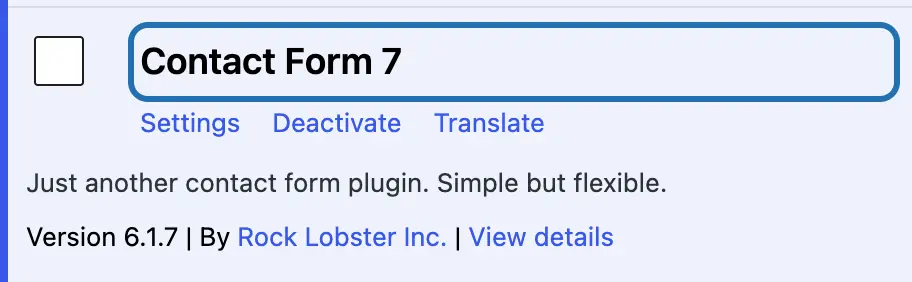
2. Go to Plugins › Add Plugin. In Search Plugins, type the job, like “popup” or “contact form”, rather than a plugin's name.

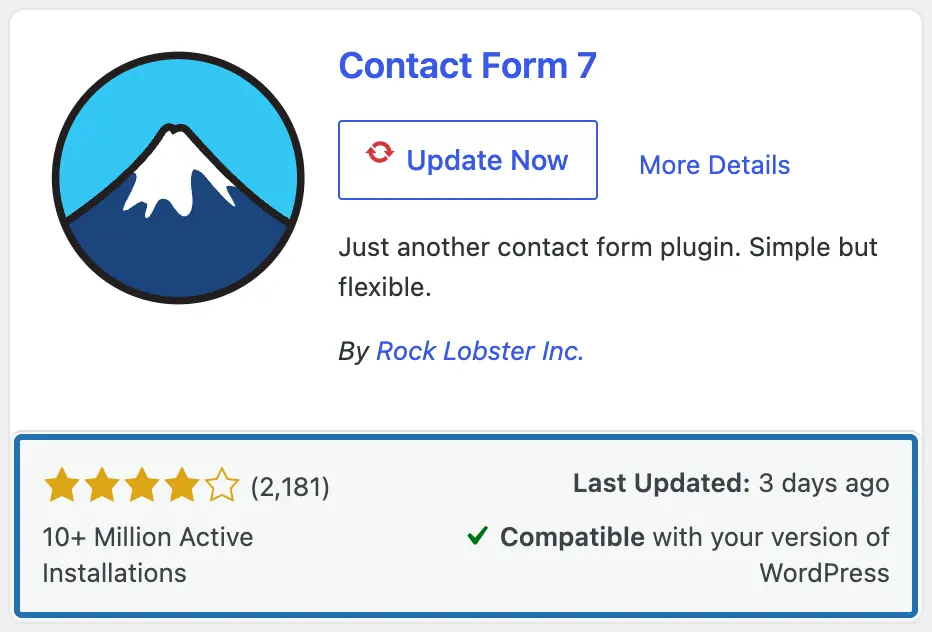
3. Read each card's bottom row: Last Updated, Active Installations, and the number beside the stars, which is how many people rated it.
Show the picture
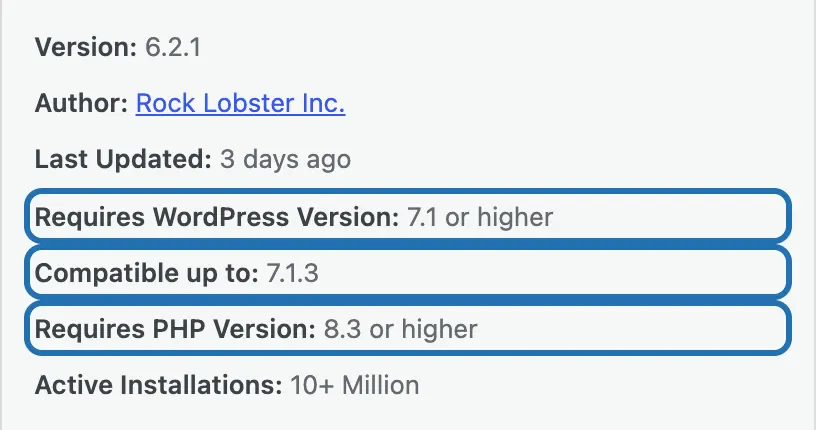
4. Open More Details. Compare Requires WordPress Version and Requires PHP Version with Tools › Site Health › Info. PHP is the language WP runs on.
Show the picture
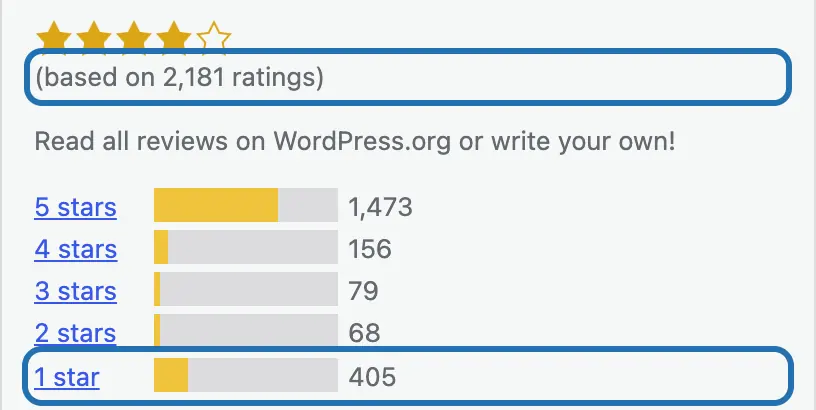
5. Below the stars, check the bars. Click 1 star to read the worst reviews on wordpress.org and see what went wrong for people.
Show the picture
6. Picked one? Install a plugin by asking shows how to install it, by hand or in the chat.


Five stars from six people says little. Four stars from thousands says more. Compatible up to is the newest WP its makers tried it with, and your host sets your PHP version. Some free plugins work only with an account at an outside service, such as an email list. The Description tab usually says so.
Or ask for it in the chat
“Which popup plugin should I use for a newsletter sign-up?”
Why it won't wreck your site
- Asking changes nothing. A question only reads your site. It looks things up and tells you. No card, no button.
- Nothing changes until you press the button. Every change comes as a card that names it. Nothing happens until you press the button or Not now.
- One click undoes it. When something can't be undone, like deleting a page or a plugin, the card says so before you press.
Where CMSHands stops
- Premium plugins: it can't find or install themIt works with the WP plugin directory only: the free plugins at wordpress.org that Plugins › Add Plugin searches. A paid plugin comes as a zip you upload yourself.
- It suggests one plugin, not a list to compareIt names the one it would choose and says why, such as how many sites use it and when it was last updated.
- It reads the listing, not the reviews, and doesn't try the pluginIt warns about plugins over a year without an update, on under 1,000 sites, rated low or by under 20 people, or needing a newer WP or PHP than yours.
- Undo removes the plugin, but maybe not what it savedUndo switches the plugin off and deletes it. Form entries or settings it saved while it was on may stay behind, depending on the plugin.
- It may not tell you a plugin needs an accountPoptin, the popup plugin it named above, needs a free Poptin account. The chat didn't say so.
More it can do
- Styling and forms:
Make a form match your site
“Make my contact form match the rest of the site.”
It took 50 seconds on our test site. - Watching your site:
It watches your site
“Update Redirection and check my site after.”
It took 19 seconds on our test site. - Updates and going back:
Go back to a plugin that worked
“Duplicate Page stopped working after the update. Go back to the version that worked.”
It took 1 minute 28 seconds on our test site.
Questions about choosing a plugin
How do I find a good plugin for my WordPress site?
Look in Plugins › Installed Plugins first: you may have one already. Then search the job in Plugins › Add Plugin and judge by more than the stars: how many people rated it, what the 1-star reviews say, and the WP and PHP versions it needs. The steps above show where to find each one.
Which popup plugin should I use?
It depends on the job: a newsletter sign-up, a sale, a notice. Search that job in Plugins › Add Plugin and check the results as in the steps above. Some popup plugins work through an account on their maker's site, so read the Description tab first. In the run above, CMSHands named Poptin and installed nothing. Poptin's wordpress.org page says you make a free Poptin account to use it. The chat didn't mention that.
Is there a free calendar or booking plugin for WordPress?
Yes, the WP plugin directory has free calendar, event and booking plugins. Search “event calendar” or “booking” in Plugins › Add Plugin. Decide what you need first: showing events, taking bookings and taking payments are different jobs, and payments often cost extra. Then check the results as in the steps above.
What if I already have a plugin for that job?
Then you likely don't need another. On our test site, a WP site we run to try every task, we asked “Which contact form plugin should I use? Install the one you'd pick.” It listed the site's plugins, saw Contact Form 7 was already on, and installed nothing. It pointed to the update waiting for it instead. Two plugins for one job, like two contact forms, don't know about each other and leave you two things to set up.
Is there a good free forum plugin for WordPress?
Yes. Search “forum” in Plugins › Add Plugin and you'll see free ones. A forum is a big job: people sign up, post and reply, and someone has to keep spam out. So pick one that's updated often and used on many sites, and read its 1-star reviews. Check what the free version includes too: some makers keep extras for a paid one.
Written by the CMSHands team. First published .
Find a plugin for your own site
- 1. Download the plugin.A free zip file
- 2. Upload and activate it.Plugins › Add Plugin › Upload Plugin
- 3. Give CMSHands a task.Press Start working, then ask in your words
Works best on WP 6.3 or newer with PHP 8.0 or newer. What works on older sites