
Admin Columns alternative for bulk edits
Admin Columns is a trademark of its owner. CMSHands is not affiliated with it.
CMSHands, a free WordPress plugin, puts a chat in your dashboard. On the paid plan, send a sheet of new prices, see each change, press once, undo in one click.
Imports are part of Pro and Max. Free today: change one product's price by asking.
Works on sites hosted at





Admin Columns and CMSHands, compared
| CMSHands | Admin Columns Pro | |
|---|---|---|
| Built for | Changes you ask for in a chat, on one site. Price changes come from a sheet you send | Your WP list screens: posts, pages, users, media and comments show the columns you pick, from 200+ types2 |
| What you install | One free plugin. The chat sits in your WP dashboard, the screens you log in to at yoursite.com/wp-admin | The free Admin Columns plugin from the WP plugin directory. Sorting, filters, editing and export come with Pro2 |
| Changing many prices | Attach a sheet with the new prices. It finds each product by its SKU and lists every change on a card, a box in the chat that shows exactly what would change | Tick products in the list, then set a new price, or raise or lower prices by an amount or a percentage3, 4 |
| A different price for each product | Yes: each row of your sheet sets its own product's price. Rows that wouldn't change anything are skipped | Bulk edit gives every ticked item the same value or the same change. For one-off prices, edit each one in the list3, 5 |
| Spreadsheets | Reads the CSV or Excel file you attach in the chat, up to 10 MB a file | Exports the list to a CSV file. Bringing changes back in from a file isn't listed on admincolumns.com/export, read Oct 11, 20266 |
| Going back | Undo on the card puts every old price back, except on products edited since | Each field you edit in the list has undo and redo5 |
| How many at once | Up to 2,000 products in one import. Split a bigger sheet into two imports | Bulk edits run in the background, and its maker says 100,000+ records should be no issue3 |
| Kinds of product | Simple products only: no variations, no product photos | Variations, sale prices and product attributes, and orders and customers too4 |
| Price | Free to start: 3 changes, then 10 a month with your email. Imports need Pro or Max | Columns are free. Pro is €79 a year for 1 site, €149 for 5, €279 for any number. It keeps working after the year, without updates or support1 |
Built for
- CMSHands
- Changes you ask for in a chat, on one site. Price changes come from a sheet you send
- Admin Columns Pro
- Your WP list screens: posts, pages, users, media and comments show the columns you pick, from 200+ types2
What you install
- CMSHands
- One free plugin. The chat sits in your WP dashboard, the screens you log in to at yoursite.com/wp-admin
- Admin Columns Pro
- The free Admin Columns plugin from the WP plugin directory. Sorting, filters, editing and export come with Pro2
Changing many prices
- CMSHands
- Attach a sheet with the new prices. It finds each product by its SKU and lists every change on a card, a box in the chat that shows exactly what would change
Show 6 more rows
A different price for each product
- CMSHands
- Yes: each row of your sheet sets its own product's price. Rows that wouldn't change anything are skipped
Spreadsheets
- CMSHands
- Reads the CSV or Excel file you attach in the chat, up to 10 MB a file
- Admin Columns Pro
- Exports the list to a CSV file. Bringing changes back in from a file isn't listed on admincolumns.com/export, read Oct 11, 20266
Going back
- CMSHands
- Undo on the card puts every old price back, except on products edited since
- Admin Columns Pro
- Each field you edit in the list has undo and redo5
How many at once
- CMSHands
- Up to 2,000 products in one import. Split a bigger sheet into two imports
- Admin Columns Pro
- Bulk edits run in the background, and its maker says 100,000+ records should be no issue3
Kinds of product
- CMSHands
- Simple products only: no variations, no product photos
- Admin Columns Pro
- Variations, sale prices and product attributes, and orders and customers too4
Price
- CMSHands
- Free to start: 3 changes, then 10 a month with your email. Imports need Pro or Max
- Admin Columns Pro
- Columns are free. Pro is €79 a year for 1 site, €149 for 5, €279 for any number. It keeps working after the year, without updates or support1
CMSHands and Admin Columns Pro, for changing many prices. Admin Columns facts read Oct 11, 2026.
- 1. admincolumns.com/pricing, Oct 11, 2026
- 2. wordpress.org/plugins/codepress-admin-columns, Oct 11, 2026
- 3. admincolumns.com/bulk-editing, Oct 11, 2026
- 4. admincolumns.com/woocommerce-columns, Oct 11, 2026
- 5. admincolumns.com/inline-editing, Oct 11, 2026
- 6. admincolumns.com/export, Oct 11, 2026
Try it free on your own site
Free to start: 3 changes with no account, then 10 a month with your email. Questions free, 30 a day. No card.
Watch it do this on a real site
You send the sheet
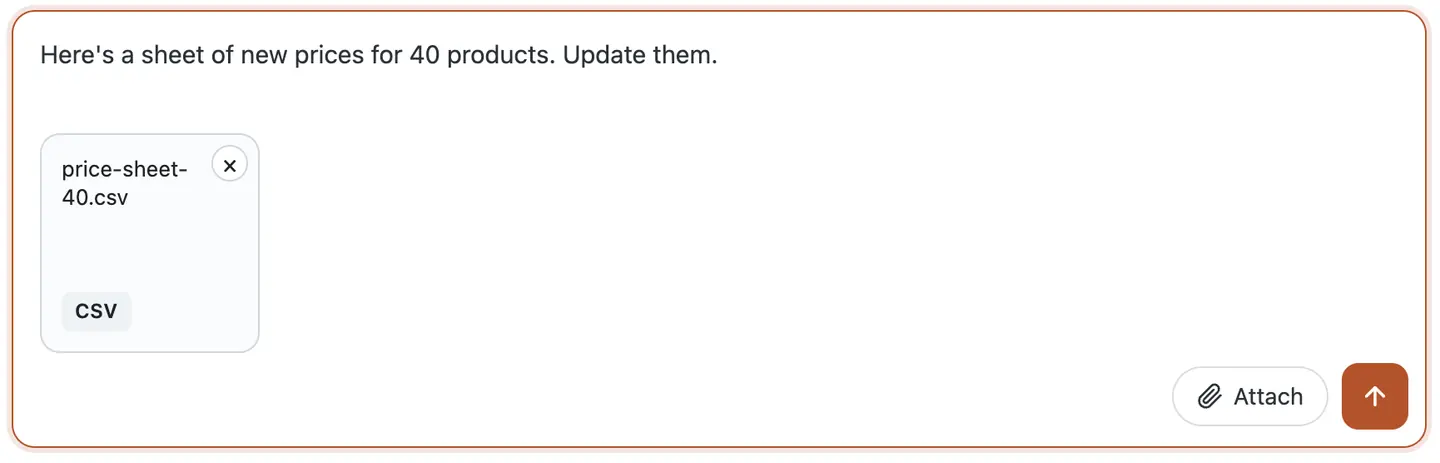
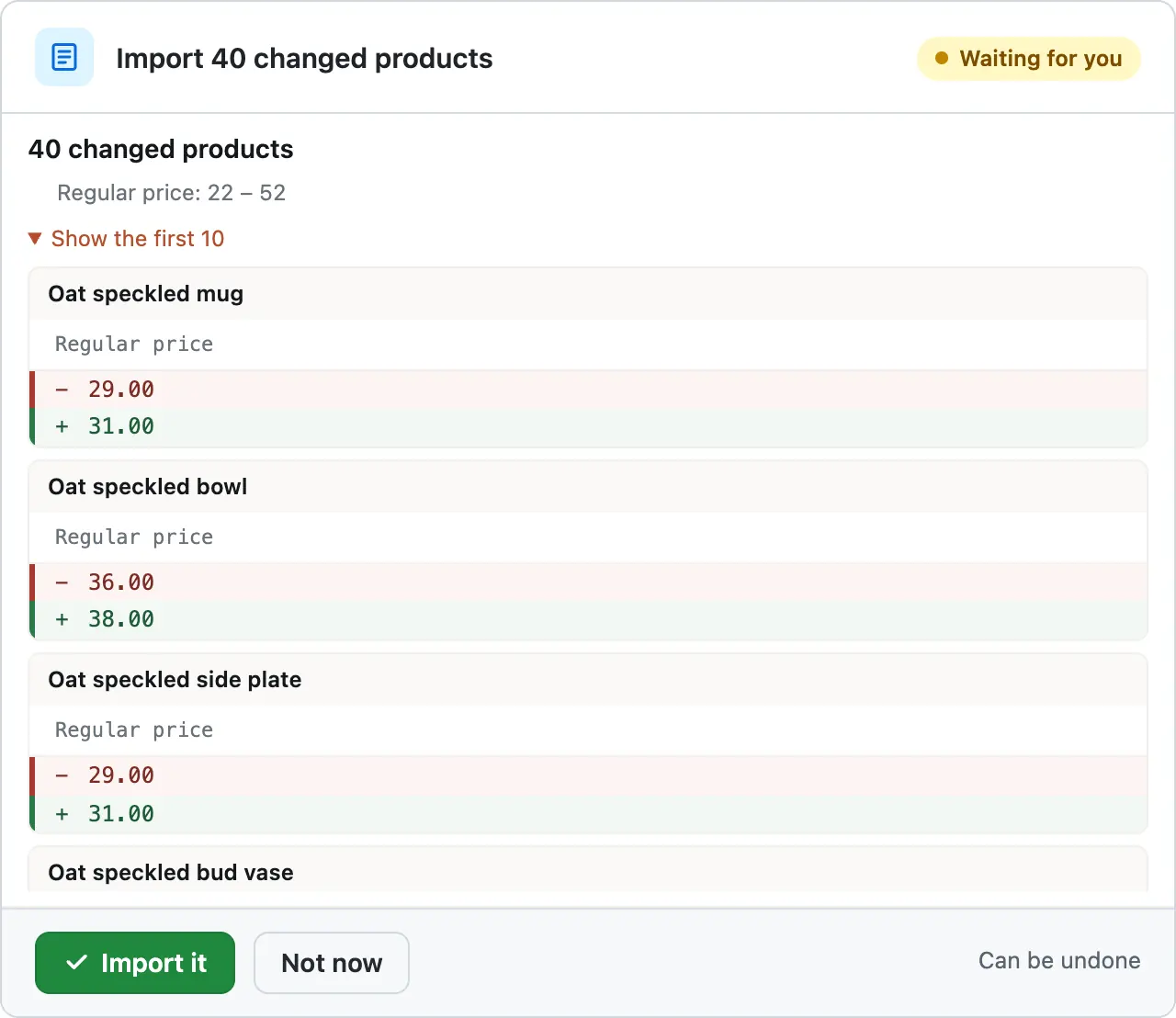

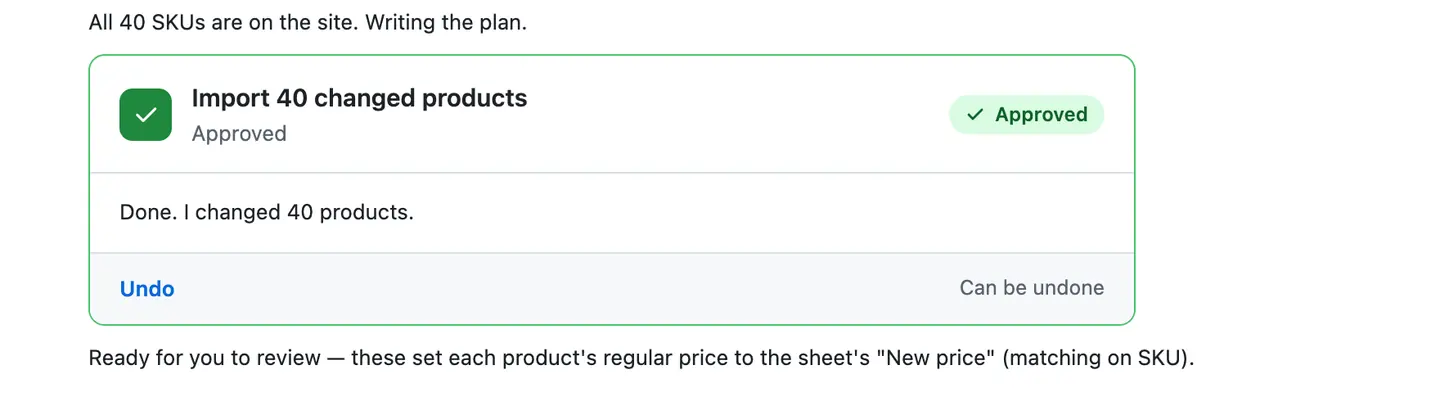
A real run on our test site, Quillmoor Pottery (WP 7.1.3, Twenty Twenty-Four), . From asking to done, it took 1 minute 14 seconds. Imports are part of Pro and Max, from $20 a month.
- Send a sheet of new prices in the chat. It finds each product by its SKU and lists every change on a card before anything is saved.
- It skips rows that wouldn't change anything, and leaves alone any product you edited after the card appeared.
- One press of Import it changes them all. On our test site, 40 prices changed about 9 seconds after the press.
More it does here (4)
- Undo on the card puts the old prices back, except on products edited since.
- Imports are on Pro and Max. Simple products only, up to 2,000 in one import.
- Free today, without the paid plan: ask for a new price on one product. The card shows the old and the new price first, one card per product, and Undo puts it back.
- Questions change nothing on your site, like which products are out of stock.
Do this on your own site
That's the whole job, on Pro or Max, from $20 a month. The plugin is free today: 3 changes to try it, no account. Nothing changes until you press the button.
Which one fits
Who should keep Admin Columns
Keep Admin Columns Pro if you work in your list screens every day. It adds the columns you pick from 200+ types, sorts and filters by them, and edits a field right in the list, with undo and redo for each field. Its bulk edit also covers variations, orders and customers, and its maker says 100,000+ records are no issue (admincolumns.com and wordpress.org, read Oct 11, 2026). CMSHands adds no columns, filters or exports: it changes prices from a sheet you send, on the paid plan.
Can you use Admin Columns and CMSHands together?
You can keep Admin Columns for your columns, filters and exports, and ask the chat for one product's new price, or which products are out of stock, on the free plan. We haven't tested the two side by side on our test site yet, so change each product's price in one of them only. If someone edits a product after the card appears, the import leaves it alone and names it.
What it won't do here
- Imports are on the paid planPrice updates from a sheet need Pro or Max. The free plugin can't run this import.
- No columns, filters or exportsIt doesn't change your list screens, export your products, or change custom fields and SEO fields from a sheet. Keep a columns plugin for that.
- Simple products, no variations or photosAn import changes simple products only. It doesn't change variations or add product photos.
- A sheet, not a ruleIt changes prices from your sheet, or one product at a time when you ask. We haven't tested raising every price by 10% without a sheet yet.
- Up to 2,000 products in one importSplit a bigger sheet into two and import them one after the other. Each import gets its own card.
Free to start
- No account
- 3 to try it
- With your email
- 10 every month
- Pro or Max
- 100 a month on Pro ($20), 500 on Max ($100), shared by your sites
A change is one card you approve. A job that touches several pages or plugins is several changes.What's free
More it can do
- Your shop:
Change a price by asking
“Change the price of the Speckled oat mug to $34.”
It took 15 seconds on our test site. - Your shop:
List what's out of stock
“Which of my products are out of stock? List them with their prices.”
It took 8 seconds on our test site. - Store imports:
Many products from a file (paid plan)
“Add these to my shop in a new category, Autumn.”
It took 1 minute 8 seconds on our test site. - Your shop:
A whole category on sale Coming soon
Say “everything in Mugs 20% off until Sunday” and get one card for the whole category, and one undo.
Questions
What does the free plugin do for my shop today?
It changes one product's price when you ask: you see the old and the new price on a card first, and Undo puts it back. One card per product. Changes like that are free: 3 to try it, then 10 a month with your email. Questions, like which products are out of stock, change nothing: 30 a day free, 100 with your email. Price updates from a sheet need Pro or Max.
Is CMSHands made by Admin Columns?
No. CMSHands is a separate product from a separate company, and it isn't affiliated with Admin Columns. If you're looking for your Admin Columns settings, they're in your own WP dashboard. For Admin Columns' help and your license, go to admincolumns.com.
What does Admin Columns Pro add to the free plugin?
The free Admin Columns adds and arranges columns on your list screens, from 200+ column types. Pro adds sorting, filters you can stack and save, editing right in the list, bulk edit, export to CSV, and support for other plugins' fields (wordpress.org and admincolumns.com, read Oct 11, 2026).
How much does Admin Columns Pro cost?
€79 a year for 1 site, €149 for 5 sites, or €279 for any number of sites. Each plan comes with a year of updates and support, and you can ask for your money back within 30 days. Its pricing page says Pro keeps working after that year, without updates or support. We read this on admincolumns.com/pricing on Oct 11, 2026.
Is the Yoast SEO or ACF support in Admin Columns free or Pro?
Pro. Its wordpress.org page lists Advanced Custom Fields, Yoast SEO, Toolset Types and Pods among the plugins Admin Columns Pro works with (read Oct 11, 2026). The free plugin manages columns on posts, pages, users, comments and media. CMSHands doesn't change custom fields or SEO fields from a sheet.
How do I change many prices with what my store already has?
Your store's own Products list can do this. In Products › All Products, tick the products, pick Edit in Bulk actions and press Apply. Under Price, set a new price, or raise or lower it by an amount or a percentage, then press Update. For a different price on each product, press Import at the top of the same list, choose a CSV with SKU and Regular price columns, and tick Update existing products.
Written by the CMSHands team. First published .
Try it on your own site
- 1. Download the plugin.A free zip file
- 2. Upload and activate it.Plugins › Add Plugin › Upload Plugin
- 3. Give CMSHands a task.Press Start working, then ask in your words
Works best on WP 6.3 or newer with PHP 8.0 or newer. What works on older sites