
WP Sheet Editor alternative: stock from your sheet
WP Sheet Editor is a trademark of its owner. CMSHands is not affiliated with it.
CMSHands, a free WordPress plugin, adds a chat to your dashboard. No grid: on the paid plan, attach your stock sheet. Nothing changes until you press.
Imports are part of Pro and Max. Free today: ask what's out of stock, or set one product's stock. See stock set free, one product at a time
Works on sites hosted at





WP Sheet Editor and CMSHands, compared
| CMSHands | WP Sheet Editor | |
|---|---|---|
| What it is | A free plugin with a chat in your WP dashboard. You attach a sheet and say what you want | A spreadsheet of your products inside your WP dashboard. You type into the cells, and the changes apply live1, 2 |
| Price | The plugin is free. Stock updates from a sheet are on the Pro and Max plans | The basic version is free. Premium for 1 site is $49.99 a year or $119.99 for life, shown as 50% off, with 14 days to ask for your money back1, 3 |
| Setting many stock counts | Attach your sheet. It reads its headings, finds each product by its SKU, and skips rows that wouldn't change anything | Free: type each new count into the grid. Premium: import a CSV, map its columns, and match rows by SKU or product ID1, 4 |
| Before anything is saved | One card shows how many products change, the range of new counts, and the first 10 old and new. Nothing is saved until you press Import it | A grid edit is saved the moment you click save. The importer shows the first rows before it starts4, 5 |
| Going back | Undo on the card puts the old counts back. It leaves alone, and names, any product edited after the import | No undo button. Its FAQ suggests a restore point for your site, or exporting a CSV first so you can import it back5 |
| A product that doesn't track stock | It switches tracking on, on the same card, on the paid plan. Not shown in the run below: every product already tracked it | Manage stock is a column you can edit, in the free version too1 |
| Rules like “decrease stock by 10” | Not tested yet. It sets the count your sheet gives | Yes, with its formulas. Premium1 |
| Sizes and colors (variations) | No. Simple products only | Premium. The free version edits simple products only1 |
| Imports on a schedule | No. You attach each sheet yourself | Yes, from an FTP server, with its paid Automations add-on4, 6 |
What it is
- CMSHands
- A free plugin with a chat in your WP dashboard. You attach a sheet and say what you want
Price
- CMSHands
- The plugin is free. Stock updates from a sheet are on the Pro and Max plans
Setting many stock counts
- CMSHands
- Attach your sheet. It reads its headings, finds each product by its SKU, and skips rows that wouldn't change anything
Show 6 more rows
Before anything is saved
- CMSHands
- One card shows how many products change, the range of new counts, and the first 10 old and new. Nothing is saved until you press Import it
Going back
- CMSHands
- Undo on the card puts the old counts back. It leaves alone, and names, any product edited after the import
- WP Sheet Editor
- No undo button. Its FAQ suggests a restore point for your site, or exporting a CSV first so you can import it back5
A product that doesn't track stock
- CMSHands
- It switches tracking on, on the same card, on the paid plan. Not shown in the run below: every product already tracked it
- WP Sheet Editor
- Manage stock is a column you can edit, in the free version too1
Rules like “decrease stock by 10”
- CMSHands
- Not tested yet. It sets the count your sheet gives
- WP Sheet Editor
- Yes, with its formulas. Premium1
Sizes and colors (variations)
- CMSHands
- No. Simple products only
- WP Sheet Editor
- Premium. The free version edits simple products only1
CMSHands and WP Sheet Editor, for setting many stock counts at once. WP Sheet Editor facts read Oct 11, 2026.
- 1. wordpress.org/plugins/woo-bulk-edit-products, Oct 11, 2026
- 2. wpsheeteditor.com/extensions/woocommerce-spreadsheet, Oct 11, 2026
- 3. wpsheeteditor.com/buy-extension, Oct 11, 2026
- 4. wpsheeteditor.com/import-woocommerce-prices-stock-ftp, Oct 11, 2026
- 5. wpsheeteditor.com/revert-changes, Oct 11, 2026
- 6. wpsheeteditor.com/extensions/automations, Oct 11, 2026
Try it free on your own site
Free to start: 3 changes with no account, then 10 a month with your email. Questions free, 30 a day. No card.
Watch it do this on a real site
You attach your sheet

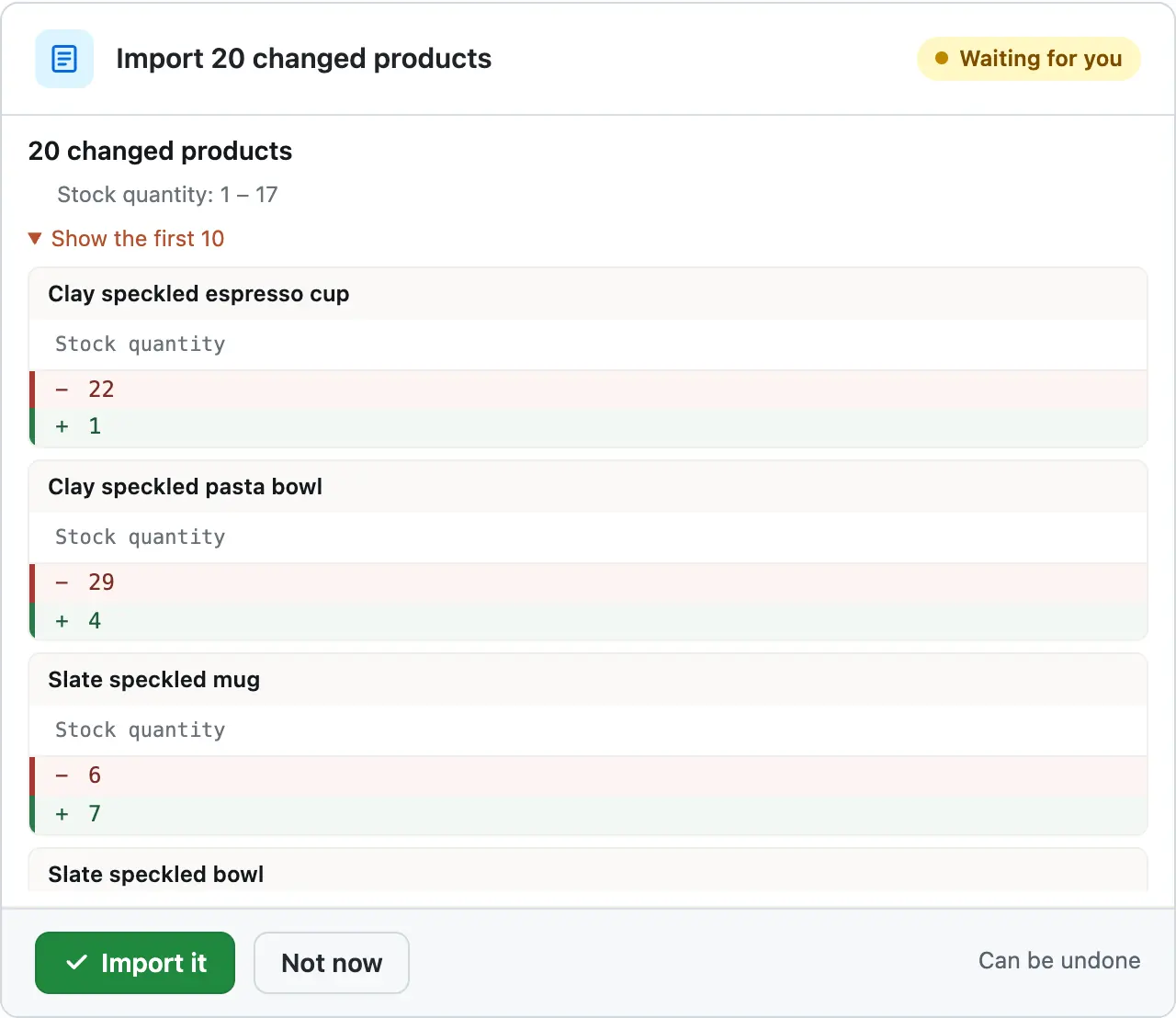
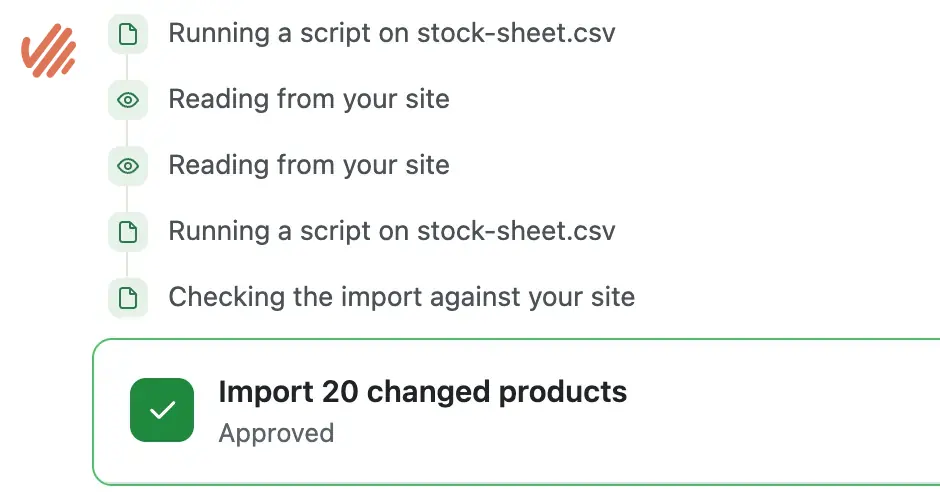
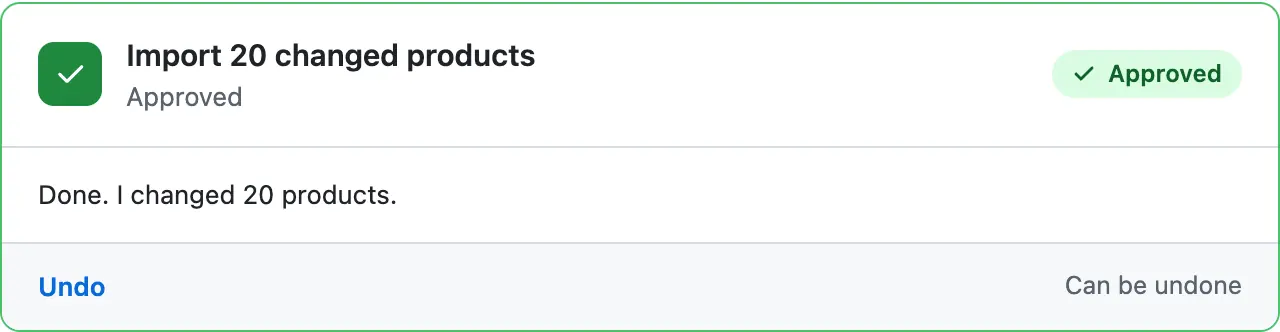
A real run on our test site, Quillmoor Pottery (WP 7.1.3, Twenty Twenty-Four), . From asking to done, it took 52 seconds. Imports are part of Pro and Max, from $20 a month.
- No grid to learn. In the chat, you attach the stock sheet you already keep and say what you want.
- Nothing is saved while you check. One card lists how many products change and the first 10 old and new counts. Nothing changes until you press Import it.
- It reads your sheet's own headings, so there's no column mapping screen, and finds each product by its SKU.
More it does here (2)
- Undo on the card puts the old counts back. It leaves alone any product edited after the import and names it.
- Free today: ask “Which of my products are out of stock?” and get the list, nothing changed. Up to 30 questions a day.
Do this on your own site
That's the whole job, on Pro or Max, from $20 a month. The plugin is free today: 3 changes to try it, no account. Nothing changes until you press the button.
Which one fits
Who should keep WP Sheet Editor
Keep WP Sheet Editor if you like to type into a grid of your products: its free version already edits stock, prices and SKUs of simple products that way. Premium adds variations, other plugins' custom fields, formulas such as “Decrease stock by 10”, and imports from Excel or Google Sheets. Its paid Automations add-on can fetch a supplier's stock file on a schedule (wordpress.org and wpsheeteditor.com, read Oct 11, 2026). CMSHands has no grid, formulas or schedule: on the paid plan, it updates stock from a sheet you send.
Can you use WP Sheet Editor and CMSHands together?
Probably, but we haven't tested the two side by side on our test site yet. Keep the grid for quick fixes, and ask the chat questions like “Which of my products are out of stock?” If you import sheets on Pro or Max, set each count in one of them only, so you know which one set it. Undo on our card leaves alone any product edited after the import, and names it.
What it won't do here
- Sheet updates need Pro or MaxUpdating stock from a sheet is part of Pro and Max. Questions about your shop are free.
- No grid and no formulasIt doesn't show your products as a spreadsheet. A rule like “decrease every count by 10”, with no sheet, is something we haven't tested yet.
- Simple products onlyIt doesn't set counts for variations, such as one mug in three glazes. Keep a tool that edits variations if your shop sells them.
- No supplier feeds or timersIt can't fetch a file from a link, an FTP server or a Google Sheet, or run on a timer. Save it as a CSV and attach it each time.
- Up to 2,000 products in one importA bigger sheet goes in as two or more imports, each with its own card. One file can be up to 10 MB.
Free to start
- No account
- 3 to try it
- With your email
- 10 every month
- Pro or Max
- 100 a month on Pro ($20), 500 on Max ($100), shared by your sites
A change is one card you approve. A job that touches several pages or plugins is several changes.What's free
More it can do
- Your shop:
List what's out of stock
“Which of my products are out of stock? List them with their prices.”
It took 8 seconds on our test site. - Your shop:
Restock and mark sold out
“I just got 20 more Rust brown mugs in, so set its stock to 29. And the Small dipping bowl is sold out, mark it out of…”
It took 18 seconds on our test site. - Your shop:
Change a price by asking
“Change the price of the Speckled oat mug to $34.”
It took 15 seconds on our test site.
Questions
Is CMSHands made by WP Sheet Editor?
No. CMSHands is a separate product from a separate company, and it isn't affiliated with WP Sheet Editor. For WP Sheet Editor's help, its demo and your license, go to wpsheeteditor.com. Its free version is on wordpress.org.
How much does WP Sheet Editor cost?
The basic version is free. Premium for products costs $49.99 a year or $119.99 for life on 1 site, and $119.99 a year or $299.99 for life on 5 sites, all shown as 50% off. You get 14 days to ask for your money back. When a yearly license runs out, only the free features keep working (wpsheeteditor.com, read Oct 11, 2026).
How do I bulk edit stock quantity without a plugin?
In Products › All Products, tick the products, choose Bulk edit under Bulk actions and press Apply. Under Stock qty, pick Change to:, type the number and press Update. Every ticked product gets that same number. (Stock qty shows only while stock management is on in your store's settings.) For a different count on each, press Import at the top of the same list, choose a CSV with SKU and Stock columns, and tick Update existing products.
How do I turn on stock management for many products at once?
Without a plugin: in Products › All Products, tick the products, choose Bulk edit under Bulk actions and press Apply. Set Manage stock? to Yes and press Update. It shows only while stock management is on in your store's settings. On the paid plan, a CMSHands stock import switches tracking on where it's off, on the same card. In the run above, every product already tracked it.
Can it add to stock or take from it, not replace the count?
We haven't tested that yet. In the run above it set each product to the number in the sheet, and the card showed the first 10 old and new counts before anything changed. If you need to take 10 off every count today, your store's own bulk edit has Decrease existing stock by: under Stock qty.
Written by the CMSHands team. First published .
Try it on your own site
- 1. Download the plugin.A free zip file
- 2. Upload and activate it.Plugins › Add Plugin › Upload Plugin
- 3. Give CMSHands a task.Press Start working, then ask in your words
Works best on WP 6.3 or newer with PHP 8.0 or newer. What works on older sites