
Product Import Export alternative, for imports
Product Import Export for WooCommerce is a trademark of its owner; WooCommerce is a trademark of Automattic Inc. CMSHands is not affiliated with either.
CMSHands, a free WordPress plugin, adds a chat to your dashboard. On the paid plan, attach your file as it is and check one card. One Undo takes it back.
Imports are part of Pro and Max. Simple products, no images. Free today: ask what's out of stock.
Works on sites hosted at





Product Import Export for WooCommerce and CMSHands, compared
| CMSHands | Product Import Export for WooCommerce | |
|---|---|---|
| What it is | A free plugin with a chat in your WP dashboard, the screens you log in to at yoursite.com/wp-admin. You attach a file and say what to do with it | A plugin with its own import and export screens in your dashboard. A free version on wordpress.org and a paid Pro version1, 2, 3 |
| Price | The plugin is free. Imports are on the Pro and Max plans | Free version. Pro is $69 a year for 1 site, $129 for 5 and $249 for 25, with 30 days to ask for your money back1, 2 |
| Your file's columns | It works out which column is which and shows the result on the card, a box in the chat that shows exactly what would change. In our run the file kept its own names: SKU, Product name, Price, Qty, Category | A mapping step where you match your columns to its fields, or Quick import for a file it exported itself3 |
| Semicolons between columns | In our run it spotted them, read 88,00 as 88.00 and said so before anything changed | You pick the separator when you import: comma, semicolon, tab, space or another character4 |
| Products you already have | Found by SKU and updated. Rows that wouldn't change anything are skipped. Paid plan | Matched by ID or SKU. You choose to skip them or update them3 |
| Sizes and colors (variations) | No. Simple products only | Pro only. The free version does simple, grouped and external products1 |
| Product pictures | Not yet | Yes, the main picture and the gallery, in the free version too1 |
| Export to a CSV | No | Yes, filtered by category, tag, status, stock status or product type1 |
| Imports on a schedule | No. You attach each new file in the chat | Pro: scheduled imports and exports over FTP or SFTP1, 2 |
| Undo the whole import | Yes, one Undo. New products go to the trash for 30 days; changed ones get their old values back | Not listed on its plugin page, Pro page or import guide, read Oct 11, 20261, 2, 3 |
What it is
- CMSHands
- A free plugin with a chat in your WP dashboard, the screens you log in to at yoursite.com/wp-admin. You attach a file and say what to do with it
Price
- CMSHands
- The plugin is free. Imports are on the Pro and Max plans
Your file's columns
- CMSHands
- It works out which column is which and shows the result on the card, a box in the chat that shows exactly what would change. In our run the file kept its own names: SKU, Product name, Price, Qty, Category
- Product Import Export for WooCommerce
- A mapping step where you match your columns to its fields, or Quick import for a file it exported itself3
Show 7 more rows
Semicolons between columns
- CMSHands
- In our run it spotted them, read 88,00 as 88.00 and said so before anything changed
- Product Import Export for WooCommerce
- You pick the separator when you import: comma, semicolon, tab, space or another character4
Products you already have
- CMSHands
- Found by SKU and updated. Rows that wouldn't change anything are skipped. Paid plan
- Product Import Export for WooCommerce
- Matched by ID or SKU. You choose to skip them or update them3
Sizes and colors (variations)
- CMSHands
- No. Simple products only
- Product Import Export for WooCommerce
- Pro only. The free version does simple, grouped and external products1
Product pictures
- CMSHands
- Not yet
- Product Import Export for WooCommerce
- Yes, the main picture and the gallery, in the free version too1
Export to a CSV
- CMSHands
- No
- Product Import Export for WooCommerce
- Yes, filtered by category, tag, status, stock status or product type1
Imports on a schedule
- CMSHands
- No. You attach each new file in the chat
CMSHands and Product Import Export for WooCommerce, for adding products from a file. Their facts read Oct 11, 2026.
- 1. wordpress.org/plugins/product-import-export-for-woo, Oct 11, 2026
- 2. webtoffee.com/product/product-import-export-woocommerce, Oct 11, 2026
- 3. webtoffee.com/docs/product-imp-exp-basic/import-export-woocommerce-products-basic, Oct 11, 2026
- 4. webtoffee.com/blog/change-woocommerce-product-import-export-delimiter, Oct 11, 2026
Try it free on your own site
Free to start: 3 changes with no account, then 10 a month with your email. Questions free, 30 a day. No card.
Watch it do this on a real site
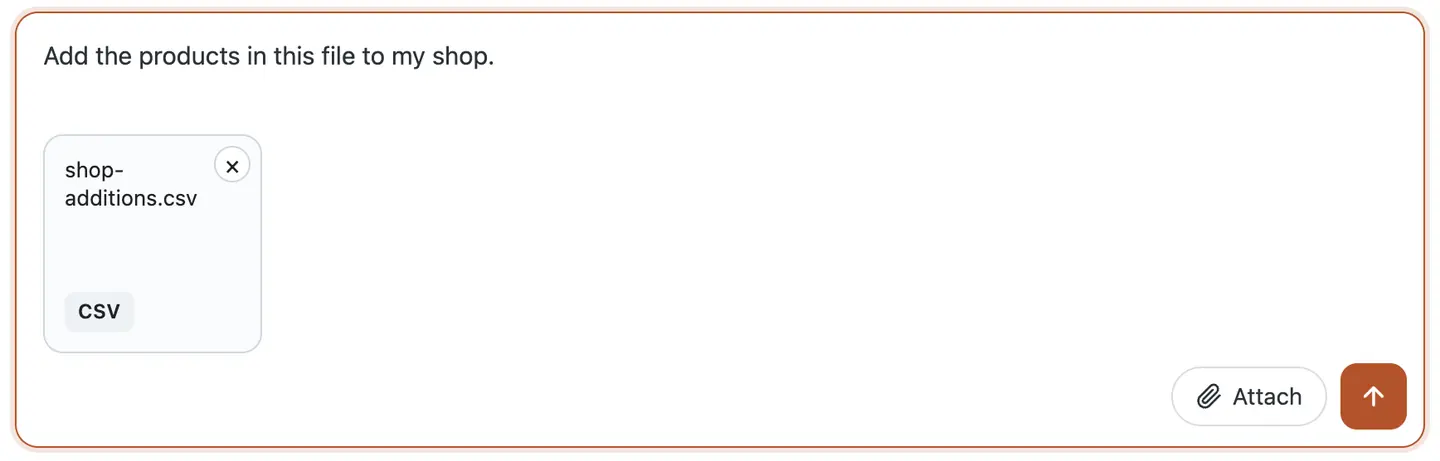
You attach your file
A real run on our test site, Quillmoor Pottery (WP 7.1.3, Twenty Twenty-Four), . From asking to done, it took 53 seconds. Imports are part of Pro and Max, from $20 a month.
- You attach your file in the chat as it is, with its own column names, and say what you want.
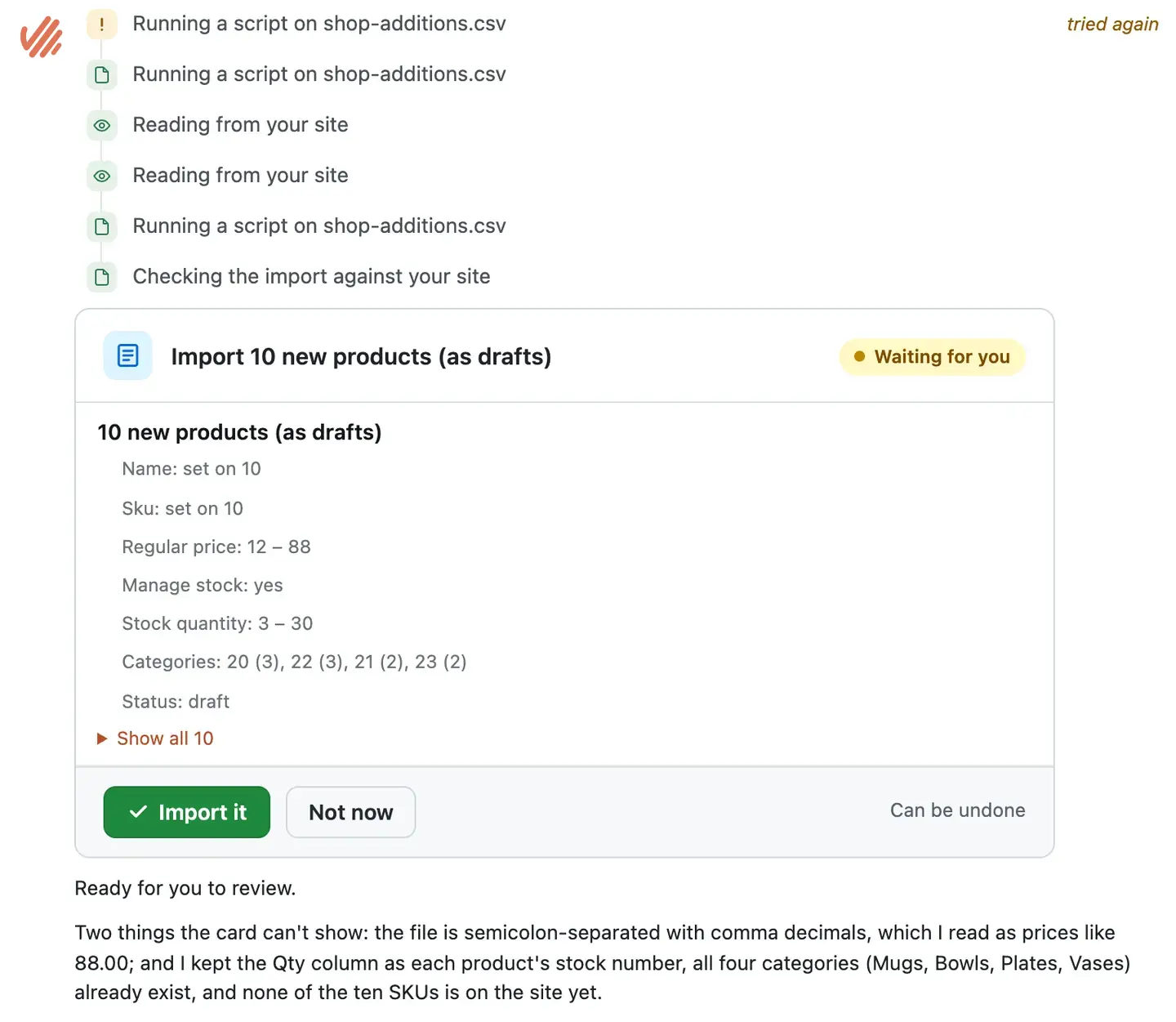
- A file with semicolons between columns and commas in prices went in unchanged; it read 88,00 as 88.00 and said so before anything changed.
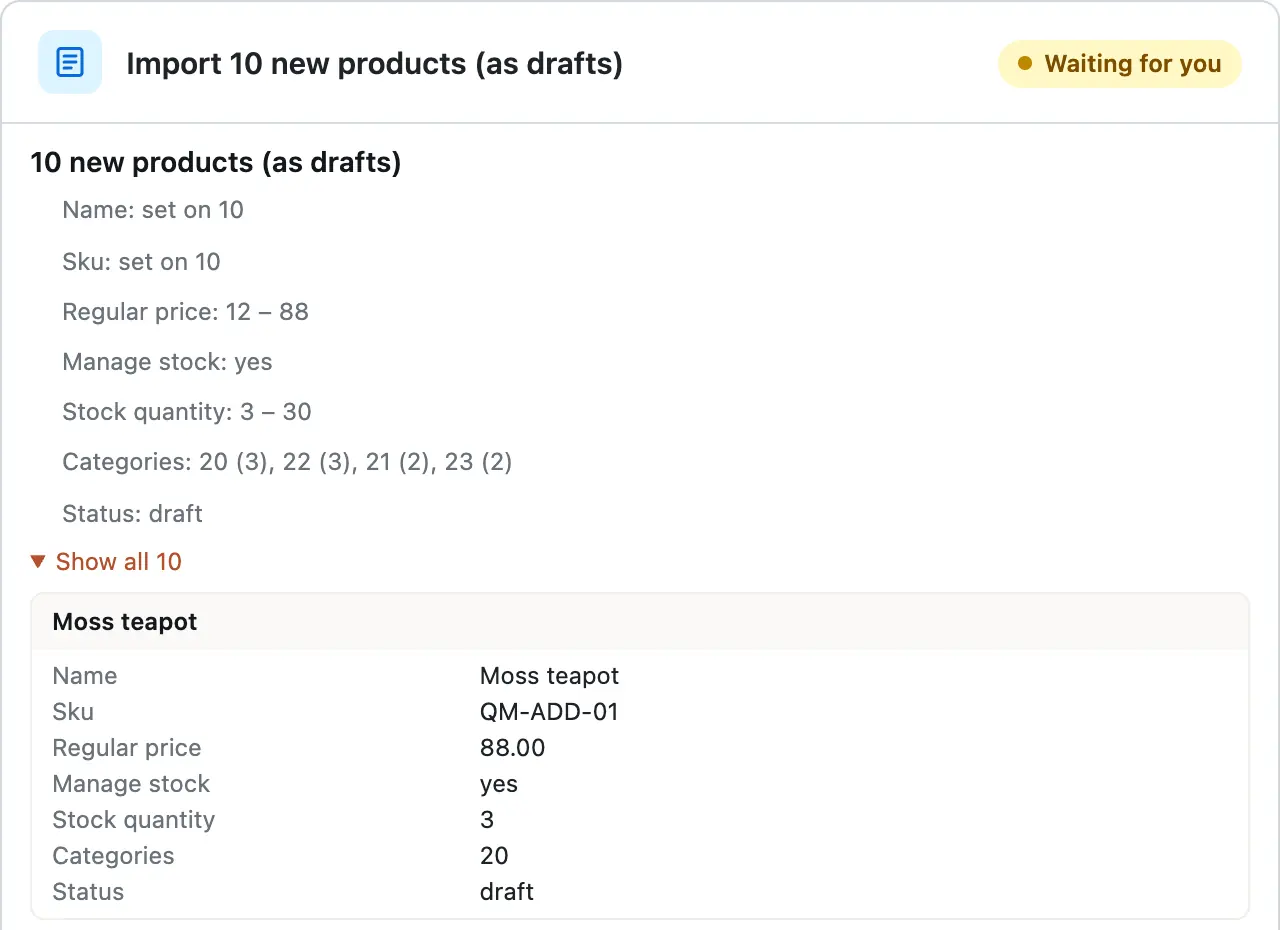
- Before anything changes, one card, a box in the chat that shows exactly what would change, lists how many products, a summary of each field, and each product's row.
More it does here (5)
- New products start as drafts unless you ask to publish them.
- It links products to the categories your shop already has, and makes the ones your file names that don't exist yet.
- A Qty or stock column becomes each product's stock number, with stock tracking switched on, on the same card.
- Products you already have are found by SKU; rows that wouldn't change anything are skipped.
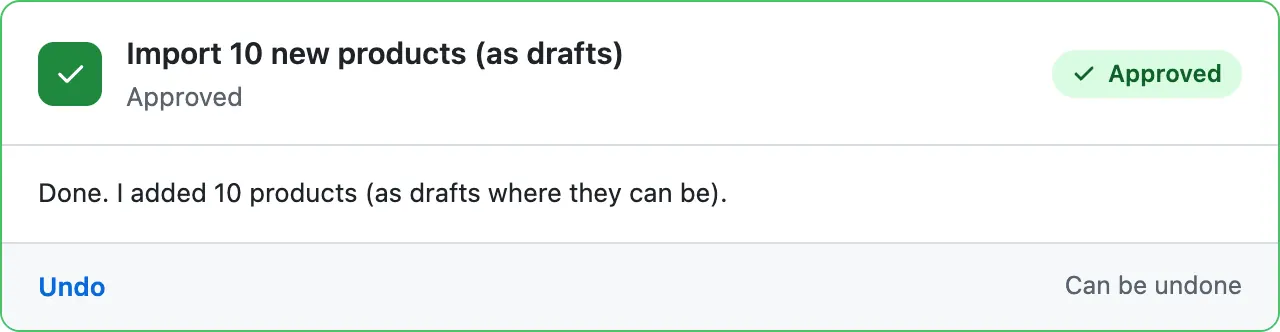
- One Undo takes back the whole import: new products go to the trash for 30 days.
Do this on your own site
That's the whole job, on Pro or Max, from $20 a month. The plugin is free today: 3 changes to try it, no account. Nothing changes until you press the button.
Which one fits
Who should keep Product Import Export for WooCommerce
Keep Product Import Export for WooCommerce if you move whole catalogs in and out. Its free version brings in each product's main picture and gallery, grouped and external products, and reviews, and it exports your products to a CSV, filtered by things like category or stock status. Pro adds products sold in sizes or colors (variations), custom fields, Excel and XML files, and imports on a schedule over FTP (wordpress.org and webtoffee.com, read Oct 11, 2026). CMSHands can't add pictures yet, and it doesn't import variations, export, or run on a schedule.
Can you use Product Import Export for WooCommerce and CMSHands together?
Yes. Imports are on Pro and Max, and the free plugin already helps with your store. It can list the products that are out of stock. It can update a plugin from wordpress.org, then check your site. It can rewrite a sentence on a page. Each change waits on a card until you approve it. Product Import Export keeps doing your exports and pictures, and variations if you have Pro. We haven't tested the two side by side on our test site yet. Until we have, send each file through one of them only, so you always know which tool made a change.
What it won't do here
- Importing needs Pro or MaxOn the free plan, it answers questions about your store and makes small changes you approve, one card at a time.
- Simple products, no variationsA product sold in sizes or colors needs another tool, and so do grouped and external products.
- No pictures from your file yetIt can't bring in product pictures from a file yet. Add them to each product once the import is done.
- No exports, schedules or extra fieldsIt doesn't export products to a file or import on a timer. It doesn't fill the fields other plugins add to products.
- Up to 2,000 products at a timeEach file can be up to 10 MB. Split a bigger catalog into parts and import them one after another.
Free to start
- No account
- 3 to try it
- With your email
- 10 every month
- Pro or Max
- 100 a month on Pro ($20), 500 on Max ($100), shared by your sites
A change is one card you approve. A job that touches several pages or plugins is several changes.What's free
More it can do
- Store imports:
A product template to fill in
“Give me a CSV template I can fill in to add products to my shop.”
It took 50 seconds on our test site. - Store imports:
Coupons from a file (paid plan)
“Create the coupons in this file.”
It took 49 seconds on our test site. - Store imports:
Customers from a file (paid plan)
“Import my customer list into WooCommerce.”
It took 1 minute 5 seconds on our test site. - Your shop:
A whole category on sale Coming soon
Say “everything in Mugs 20% off until Sunday” and get one card for the whole category, and one undo.
Questions
Is CMSHands made by WebToffee?
No. CMSHands is a separate product from a separate company. It isn't affiliated with WebToffee, with Product Import Export for WooCommerce or with WooCommerce itself. For help with their plugin, use the support forum on its wordpress.org page or the help on webtoffee.com.
What does Product Import Export for WooCommerce cost?
The basic version is free on wordpress.org. Pro costs $69 a year for 1 site, $129 for 5 sites and $249 for 25, with a year of updates and support and 30 days to ask for your money back. We read these prices on webtoffee.com on Oct 11, 2026, so check there for today's.
Does the free version import products with sizes or colors?
No. Its wordpress.org page says the free version doesn't support variable products, the kind sold in sizes or colors. For those you need Pro. The free version covers simple, grouped and external products (read Oct 11, 2026). CMSHands doesn't import variations either, so keep their Pro or another tool for them.
My CSV uses semicolons and prices like 88,00. Will that work?
It did in our run. The file had semicolons between the columns and commas in the prices. It read 88,00 as 88.00 and told us so under the card, before anything changed. In Product Import Export you set the separator yourself, in the Delimiter menu when you import (webtoffee.com, read Oct 11, 2026).
Can I undo an import if the prices come out wrong?
With CMSHands, yes. One Undo takes back the whole import: new products go to the trash, where they stay for 30 days, and products it changed get their old values back. It leaves alone any product you edited after the import. Product Import Export's plugin page and import guide don't list an undo (read Oct 11, 2026).
What can the free plan do for my store?
Answer questions and make small changes you approve. Ask “Which of my products are out of stock?” and you get a list, with nothing changed. It can change the words on a page, or update a free plugin from wordpress.org and check your site after. You get 3 changes with no account, then 10 a month with your email.
Written by the CMSHands team. First published .
Try it on your own site
- 1. Download the plugin.A free zip file
- 2. Upload and activate it.Plugins › Add Plugin › Upload Plugin
- 3. Give CMSHands a task.Press Start working, then ask in your words
Works best on WP 6.3 or newer with PHP 8.0 or newer. What works on older sites