
WP Importer alternative: attach the export file
WordPress Importer is a trademark of its owner. CMSHands is not affiliated with it.
CMSHands, a free WordPress plugin, adds a chat to your dashboard. On the paid plan, attach your WP export file and see each post first. One Undo reverses it.
Needs Pro or Max. Posts as drafts, no images.
Works on sites hosted at





WordPress Importer and CMSHands, compared
| CMSHands | WordPress Importer | |
|---|---|---|
| What it is | A free plugin with a chat in your WP dashboard, the screens you log in to at yoursite.com/wp-admin. You attach the export file and say what you want | A free plugin by WordPress.org for WordPress export files. You run it from Tools › Import1 |
| Price | The plugin is free. Imports are on the Pro and Max plans | Free1 |
| What it brings in | Posts, with their dates, and the categories they use. New posts start as drafts | Posts, pages and other post types, comments, custom fields, categories, tags, other terms and authors1 |
| Authors | No. It doesn't add users or set a post's author | Yes. It can add them as new users or match them to people already on your site1 |
| Images in the posts | Not yet. Add them to each post after the import | Yes. It can download the files the posts use, its page says1 |
| Custom fields from other plugins | No. It can't fill the extra fields other plugins add | Yes, listed among what it imports1 |
| See it before it changes | Yes. One card lists each post and each new category before you press the button | Not listed on its plugin page, read Oct 14, 20261 |
| Undo an import | Yes, one Undo. New posts go to the trash for 30 days, and new categories are deleted | Not listed on its plugin page, read Oct 14, 20261 |
| A big file | At most 2,000 posts in one import, from a file of up to 10 MB. Our test run had 3 | Its page says a big file can run out of memory, and suggests splitting it and importing the pieces one at a time1 |
What it is
- CMSHands
- A free plugin with a chat in your WP dashboard, the screens you log in to at yoursite.com/wp-admin. You attach the export file and say what you want
- WordPress Importer
- A free plugin by WordPress.org for WordPress export files. You run it from Tools › Import1
Price
- CMSHands
- The plugin is free. Imports are on the Pro and Max plans
- WordPress Importer
- Free1
What it brings in
- CMSHands
- Posts, with their dates, and the categories they use. New posts start as drafts
- WordPress Importer
- Posts, pages and other post types, comments, custom fields, categories, tags, other terms and authors1
Show 6 more rows
Authors
- CMSHands
- No. It doesn't add users or set a post's author
- WordPress Importer
- Yes. It can add them as new users or match them to people already on your site1
Images in the posts
- CMSHands
- Not yet. Add them to each post after the import
- WordPress Importer
- Yes. It can download the files the posts use, its page says1
Custom fields from other plugins
- CMSHands
- No. It can't fill the extra fields other plugins add
- WordPress Importer
- Yes, listed among what it imports1
See it before it changes
- CMSHands
- Yes. One card lists each post and each new category before you press the button
- WordPress Importer
- Not listed on its plugin page, read Oct 14, 20261
Undo an import
- CMSHands
- Yes, one Undo. New posts go to the trash for 30 days, and new categories are deleted
- WordPress Importer
- Not listed on its plugin page, read Oct 14, 20261
A big file
- CMSHands
- At most 2,000 posts in one import, from a file of up to 10 MB. Our test run had 3
- WordPress Importer
- Its page says a big file can run out of memory, and suggests splitting it and importing the pieces one at a time1
CMSHands and WordPress Importer, for bringing posts from a WordPress export file. WordPress Importer facts read Oct 14, 2026.
- 1. wordpress.org/plugins/wordpress-importer, Oct 14, 2026
Try it free on your own site
Free to start: 3 changes with no account, then 10 a month with your email. Questions free, 30 a day. No card.
Watch it do this on a real site
You see it first
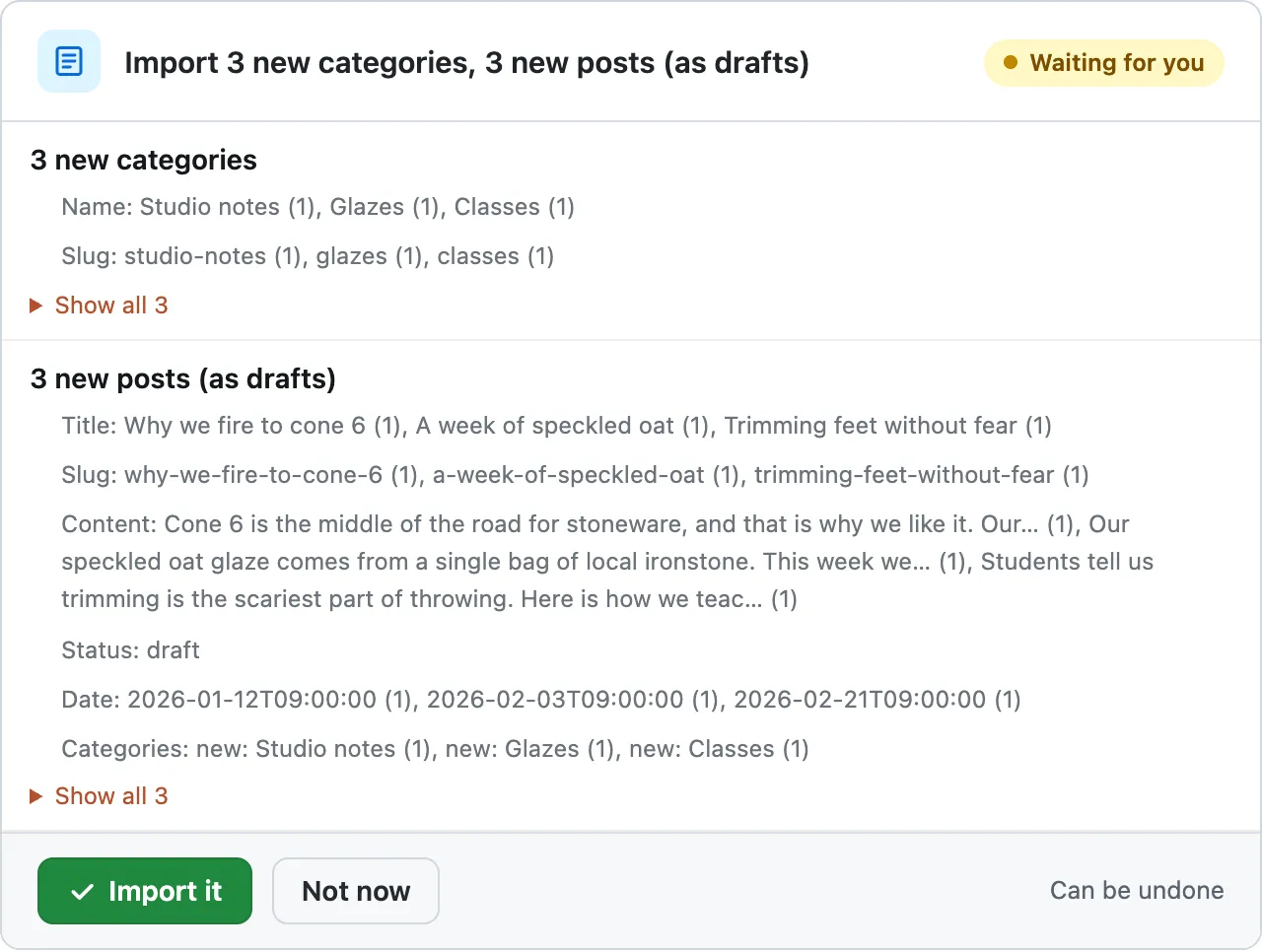
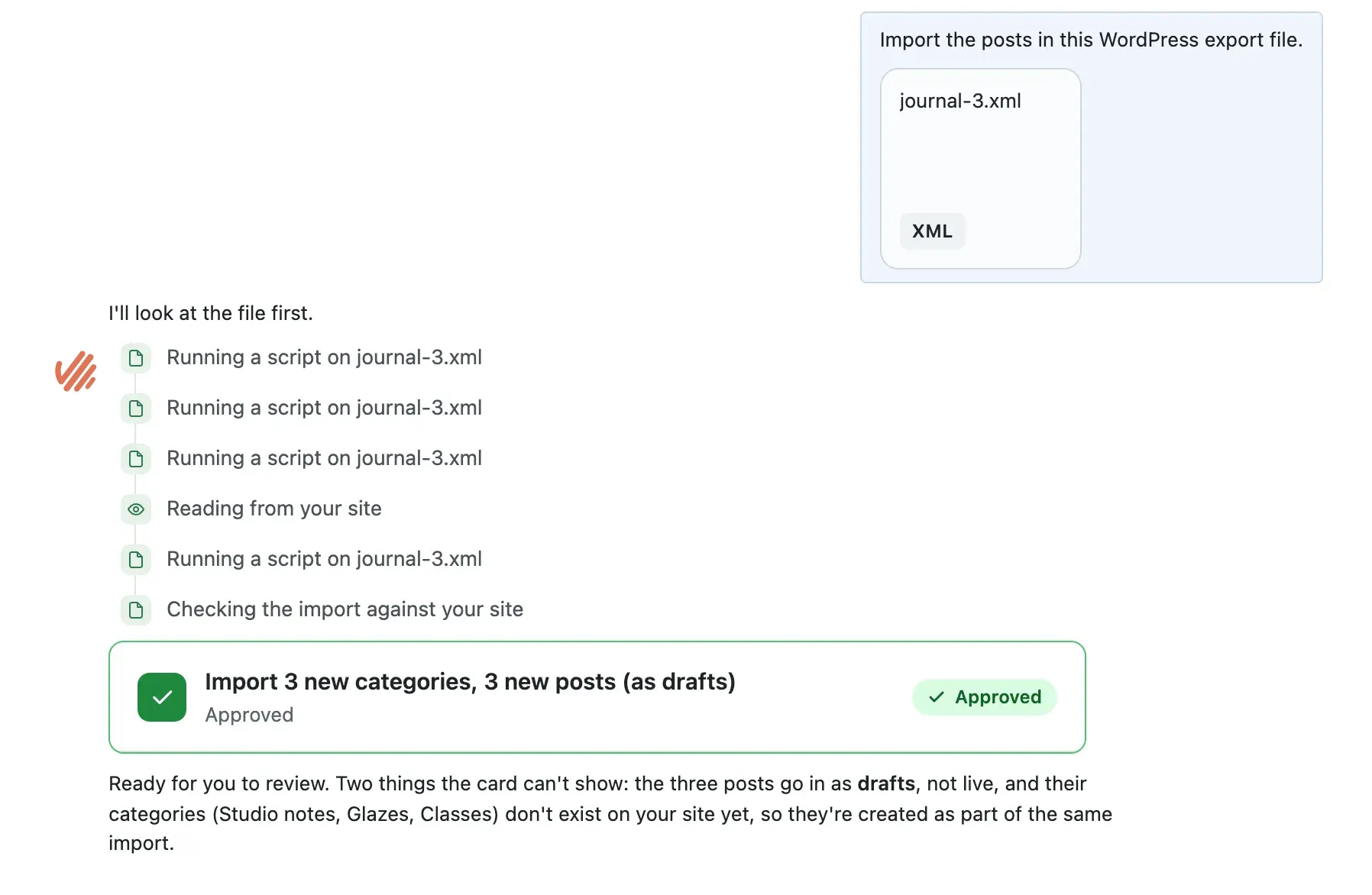
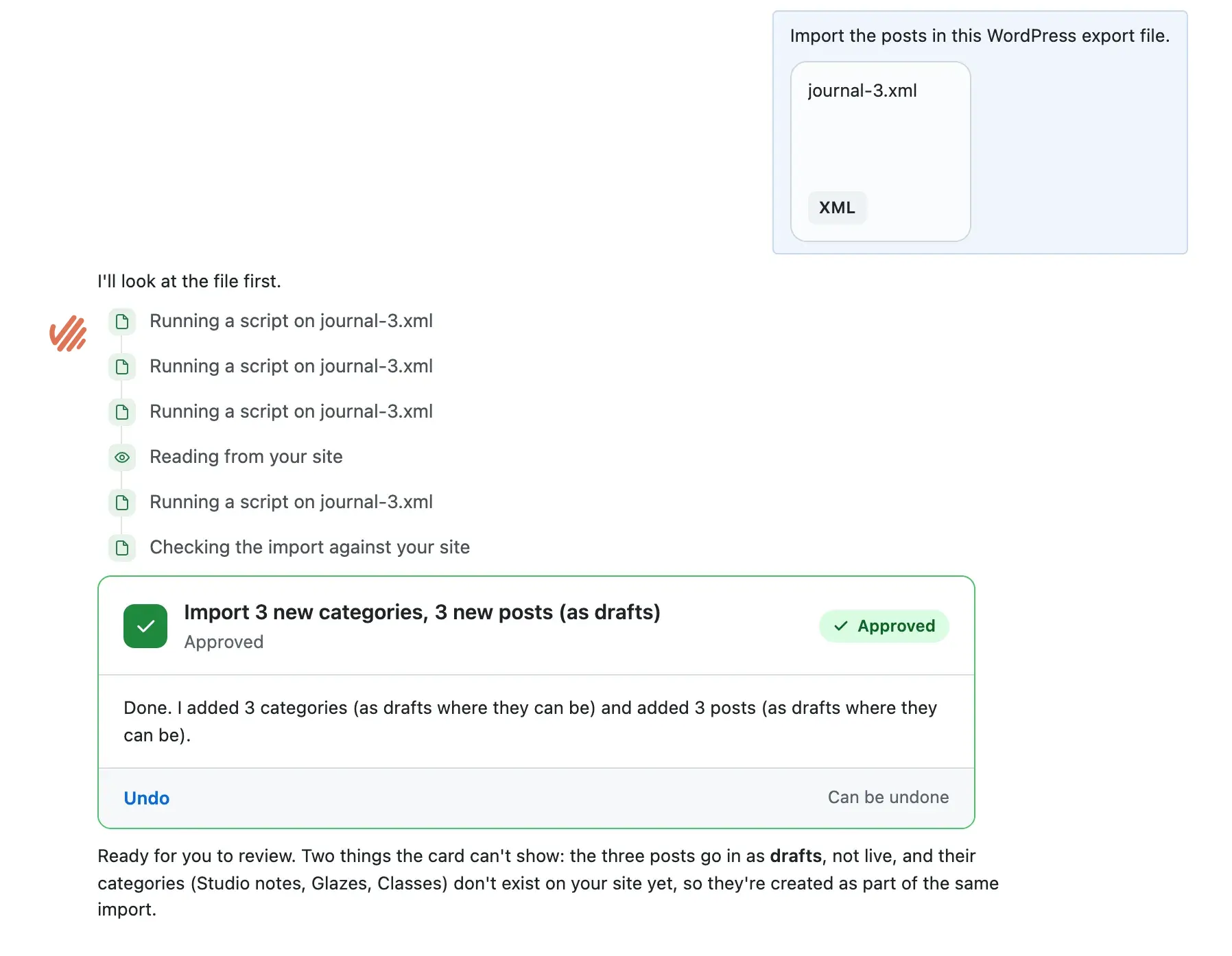
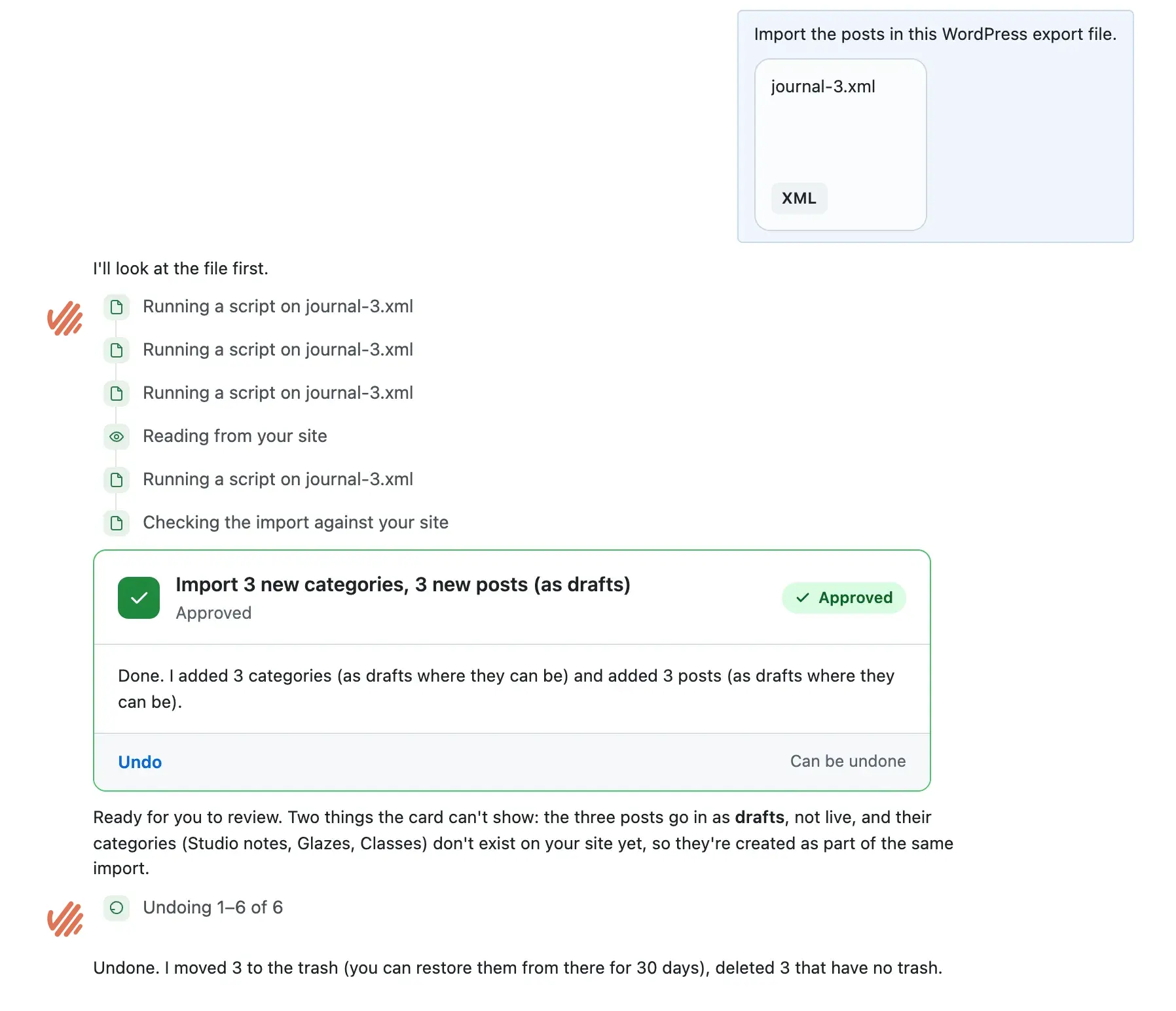
A real run on our test site, Quillmoor Pottery (WP 7.1.3, Twenty Twenty-Four), . From asking to done, it took 1 minute 1 second. Imports are part of Pro and Max, from $20 a month.
- Attach the file from Tools › Export as it is. It reads the posts, their dates and their categories.
- Before anything changes, a card (a box in the chat) shows each post's title, date and first words, and new categories.
- New posts go in as drafts, so nothing shows on your site until you publish them.
More it does here (3)
- Categories your site doesn't have yet are added in the same import, before the posts that use them.
- One Undo moves the new posts to the trash for 30 days and deletes the new categories.
- On our test blog, a 3-post export reached the card about 52 seconds after we asked.
Do this on your own site
That's the whole job, on Pro or Max, from $20 a month. The plugin is free today: 3 changes to try it, no account. Nothing changes until you press the button.
Which one fits
Who should keep WordPress Importer
Keep WordPress Importer to move a whole site. From one file it brings pages, comments, custom fields, tags, other terms, authors and images, and it's free (wordpress.org, read Oct 14, 2026). CMSHands can't add authors as users or fill custom fields, and it can't add images yet.
Can you use WordPress Importer and CMSHands together?
Yes. Use WordPress Importer to move a whole site, with its comments, authors and custom fields. Use the chat, on Pro or Max, for a few posts you want to see on one card first. We haven't tested the two side by side yet.
Why it won't wreck your site
- Nothing changes until you press the button. Every change comes as a card that names it. Nothing happens until you press the button or Not now.
- One click undoes it. When something can't be undone, like deleting a page or a plugin, the card says so before you press.
What it won't do here
- Imports need Pro or MaxOn the free plan, it answers questions about your blog and changes the words on your pages when you approve.
- No images or other media yetIt doesn't bring the pictures and files named in the export into your media library. Add them to each post after the import.
- No authors or custom fieldsIt can't add the file's authors as users, set a post's author or fill the extra fields other plugins add.
- A file, not a feed addressAttach the export file itself. It can't fetch a file or a feed from a web address.
- At most 2,000 posts in one importEach file can be up to 10 MB. Split a bigger export and import the parts one after the other.
Free to start
- No account
- 3 to try it
- With your email
- 10 every month
- Pro or Max
- 100 a month on Pro ($20), 500 on Max ($100), shared by your sites
A change is one card you approve. A job that touches several pages or plugins is several changes.What's free
More it can do
- Words and pages:
Rename or add a blog category
“Rename the blog category "News" to "Studio news" and add a new category "Glazes".”
It took 15 seconds on our test site. - Words and pages:
Copy a page
“Make a copy of the About page as a draft called "About (new)".”
It took 16 seconds on our test site. - Words and pages:
Add a page
“Add a page called Classes: Saturday classes, 10am, $45, book by email.”
It took 12 seconds on our test site.
Questions
Is CMSHands part of WordPress Importer?
No. CMSHands is a separate plugin from a separate company, and it isn't affiliated with WordPress.org or the WordPress Importer plugin. For help with WordPress Importer, use the support forum on its wordpress.org plugin page.
How do I use the WordPress Importer plugin?
Go to Tools › Import in your dashboard. Under WordPress, click Install Now, then Run Importer, and upload your export file. A big file can run out of memory. Its plugin page suggests splitting it and importing the pieces one at a time (wordpress.org, read Oct 14, 2026).
What does WordPress Importer bring over from an export file?
Posts, pages and other post types, comments, custom fields, categories, tags, other terms and authors, its plugin page says. You make the file on the old site in Tools › Export. It's free, with 2+ million active installs and 3.1 out of 5 stars from 327 reviews (wordpress.org, read Oct 14, 2026).
Can CMSHands import a WordPress export file?
Yes, on Pro and Max. Attach the file from Tools › Export. One card shows each post and each new category before anything changes. Our 3-post test export went in as 3 drafts in 3 new categories, and one Undo took it all back. Images don't come in yet.
What does the free plugin do for my blog right now?
It answers questions about your blog and makes small changes you approve. It can change the words on a page or post, and you see the change before it happens. You get 3 changes with no account, then 10 a month once you add your email. Imports come with Pro and Max.
How do I make a WordPress export file?
On the old site, go to Tools › Export. Pick All content, or Posts for posts only, then click Download Export File. You get one .xml file. That file is what you upload to WordPress Importer or attach in the chat.
Written by the CMSHands team. First published .
Try it on your own site
- 1. Download the plugin.A free zip file
- 2. Upload and activate it.Plugins › Add Plugin › Upload Plugin
- 3. Give CMSHands a task.Press Start working, then ask in your words
Works best on WP 6.3 or newer with PHP 8.0 or newer. What works on older sites