
Style Gravity Forms to match your site
CMSHands, a free WordPress plugin, adds a chat to your dashboard. Type “Make my contact form match the rest of the site.” See the CSS first; one-click undo.
Shown: our Contact Form 7 run. We haven't run it on a Gravity Forms form yet. Block themes only. How to tell
Shown: our Contact Form 7 run. We haven't run it on a Gravity Forms form yet. Block themes only. How to tell
Gravity Forms is a trademark of its owner. CMSHands is not affiliated with it.
Works on sites hosted at





Watch it style a Contact Form 7 form on our test site
This run styles a Contact Form 7 form on our test site, a WP site we run to try every task before we write about it. It has no Gravity Forms license yet, so we haven't run it on a Gravity Forms form. The chat's styling tool accepts the box Gravity Forms puts around a form, the same way it took Contact Form 7's.
You ask
Make my contact form match the rest of the site.
Make my contact form match the rest of the site.

- Looking for what you meant
- Listing your plugins and themes
- Looking at your theme’s colours and sizes
- Reading one of your pages
- Reading a file on your site
- Preparing the new styles for your OK
- Previewing the change
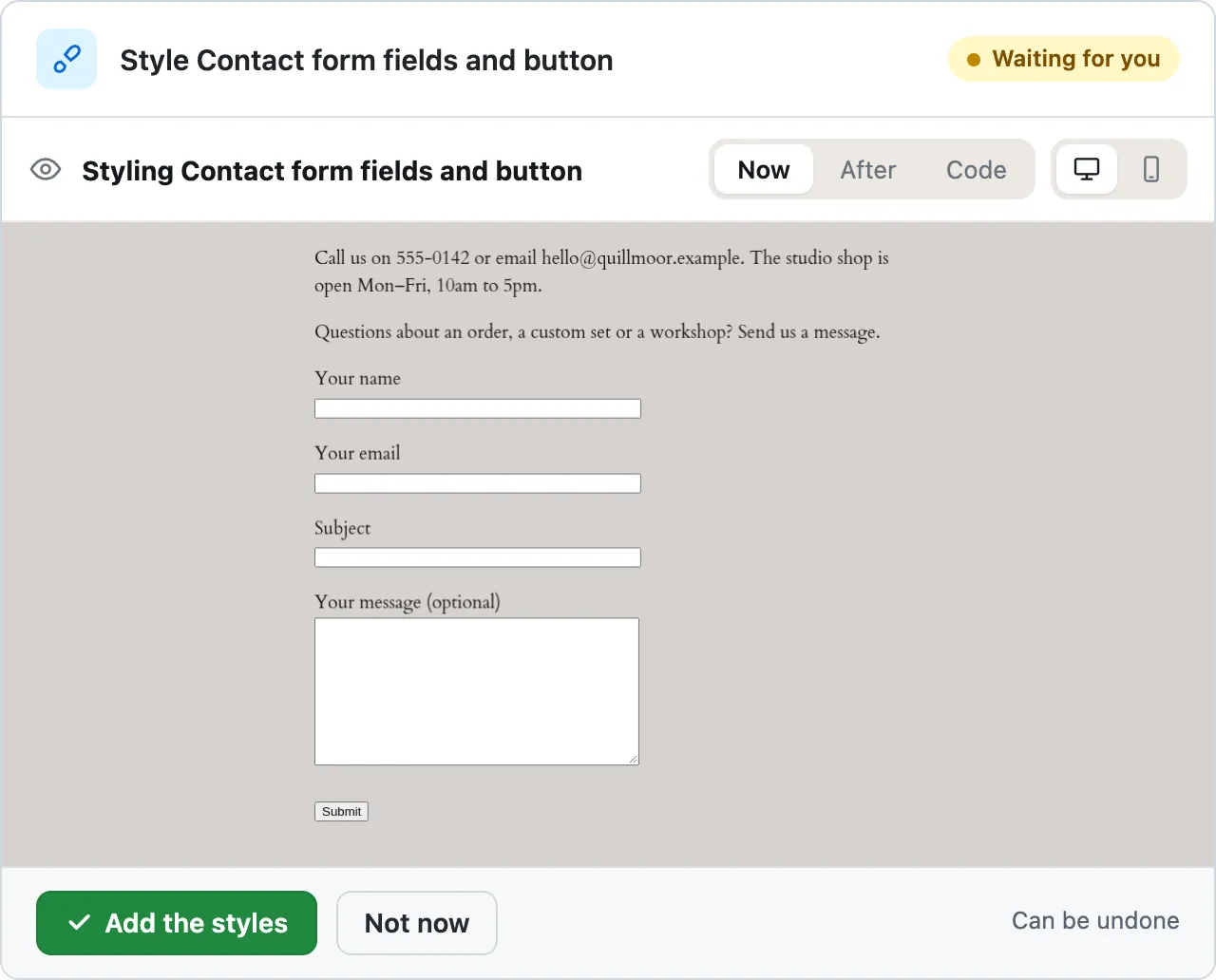
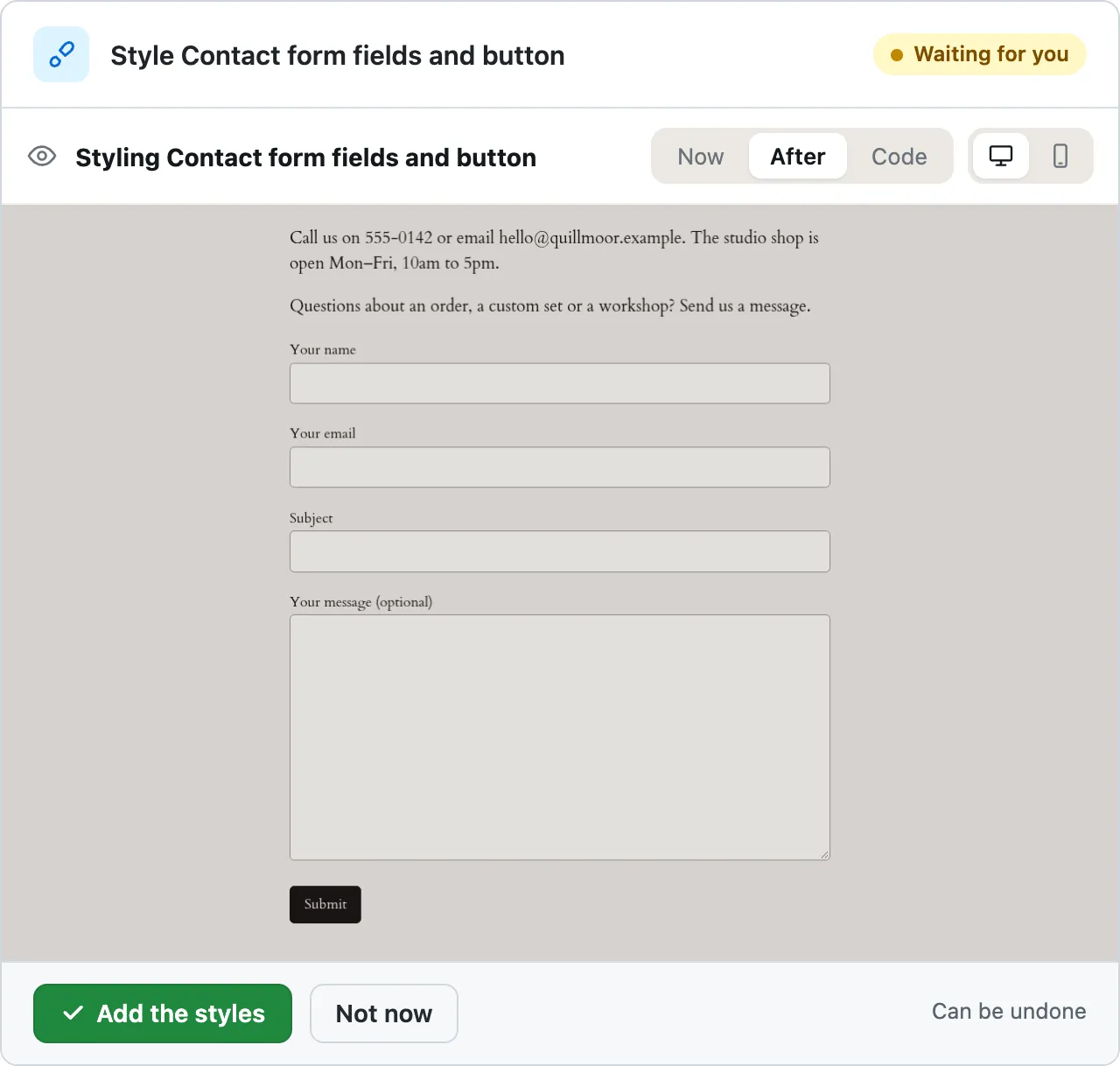
- /* CMSHands: Contact form fields and button */
- .wpcf7 input.wpcf7-form-control:not([type="submit"]),
- .wpcf7 textarea.wpcf7-form-control {
- background-color: var(--wp--preset--color--base-2);
- border: 1px solid var(--wp--preset--color--contrast-3);
- border-radius: .33rem;
- box-sizing: border-box;
- color: var(--wp--preset--color--contrast);
- font-family: inherit;
- font-size: var(--wp--preset--font-size--medium);
- padding: .6rem .75rem;
- width: 100%;
- }
- .wpcf7 input.wpcf7-form-control:focus,
- .wpcf7 textarea.wpcf7-form-control:focus {
- border-color: var(--wp--preset--color--contrast);
- outline: 2px solid var(--wp--preset--color--contrast);
- outline-offset: 1px;
- }
- .wpcf7 input.wpcf7-submit {
- background-color: var(--wp--preset--color--contrast);
- border: 1px solid var(--wp--preset--color--contrast);
- border-radius: .33rem;
- color: var(--wp--preset--color--base);
- cursor: pointer;
- font-family: inherit;
- font-size: var(--wp--preset--font-size--small);
- font-weight: 500;
- padding: .6rem 1rem;
- }
- .wpcf7 input.wpcf7-submit:hover,
- .wpcf7 input.wpcf7-submit:focus {
- background-color: var(--wp--preset--color--contrast-2);
- border-color: var(--wp--preset--color--contrast-2);
- color: var(--wp--preset--color--base);
- }
- .wpcf7 label {
- color: var(--wp--preset--color--contrast);
- font-size: var(--wp--preset--font-size--small);
- }
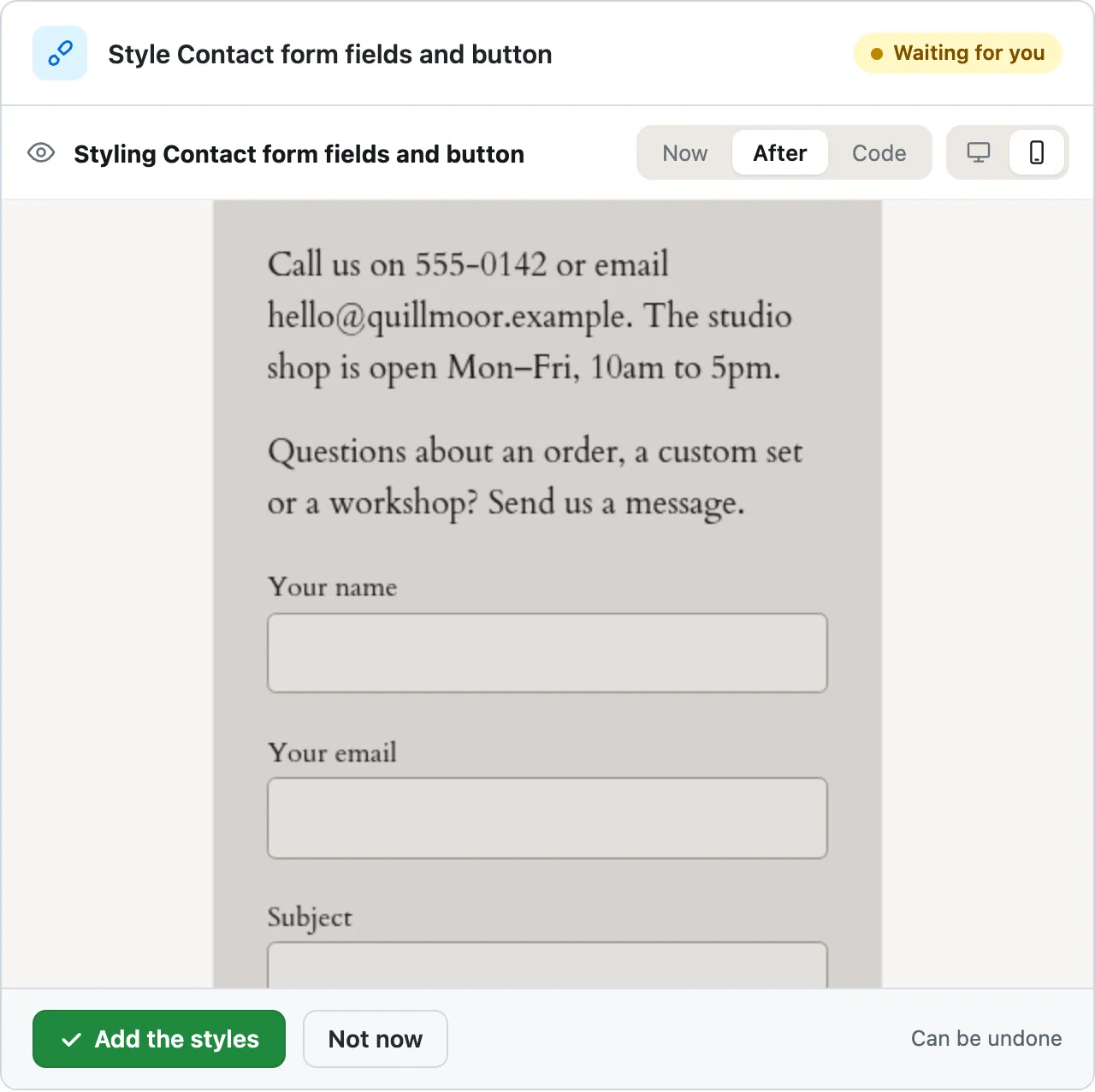
Styling Contact form fields and button
I'll find your contact form and see what's in it.
Ready for you to review — the fields and the Submit button now use the same colours, corner rounding and text sizes as the rest of the site's buttons and forms.
Make my contact form match the rest of the site.
- /* CMSHands: Contact form fields and button */
- .wpcf7 input.wpcf7-form-control:not([type="submit"]),
- .wpcf7 textarea.wpcf7-form-control {
- background-color: var(--wp--preset--color--base-2);
- border: 1px solid var(--wp--preset--color--contrast-3);
- border-radius: .33rem;
- box-sizing: border-box;
- color: var(--wp--preset--color--contrast);
- font-family: inherit;
- font-size: var(--wp--preset--font-size--medium);
- padding: .6rem .75rem;
- width: 100%;
- }
- .wpcf7 input.wpcf7-form-control:focus,
- .wpcf7 textarea.wpcf7-form-control:focus {
- border-color: var(--wp--preset--color--contrast);
- outline: 2px solid var(--wp--preset--color--contrast);
- outline-offset: 1px;
- }
- .wpcf7 input.wpcf7-submit {
- background-color: var(--wp--preset--color--contrast);
- border: 1px solid var(--wp--preset--color--contrast);
- border-radius: .33rem;
- color: var(--wp--preset--color--base);
- cursor: pointer;
- font-family: inherit;
- font-size: var(--wp--preset--font-size--small);
- font-weight: 500;
- padding: .6rem 1rem;
- }
- .wpcf7 input.wpcf7-submit:hover,
- .wpcf7 input.wpcf7-submit:focus {
- background-color: var(--wp--preset--color--contrast-2);
- border-color: var(--wp--preset--color--contrast-2);
- color: var(--wp--preset--color--base);
- }
- .wpcf7 label {
- color: var(--wp--preset--color--contrast);
- font-size: var(--wp--preset--font-size--small);
- }
Styling Contact form fields and button
- Adding styles to your site
- Checking the change
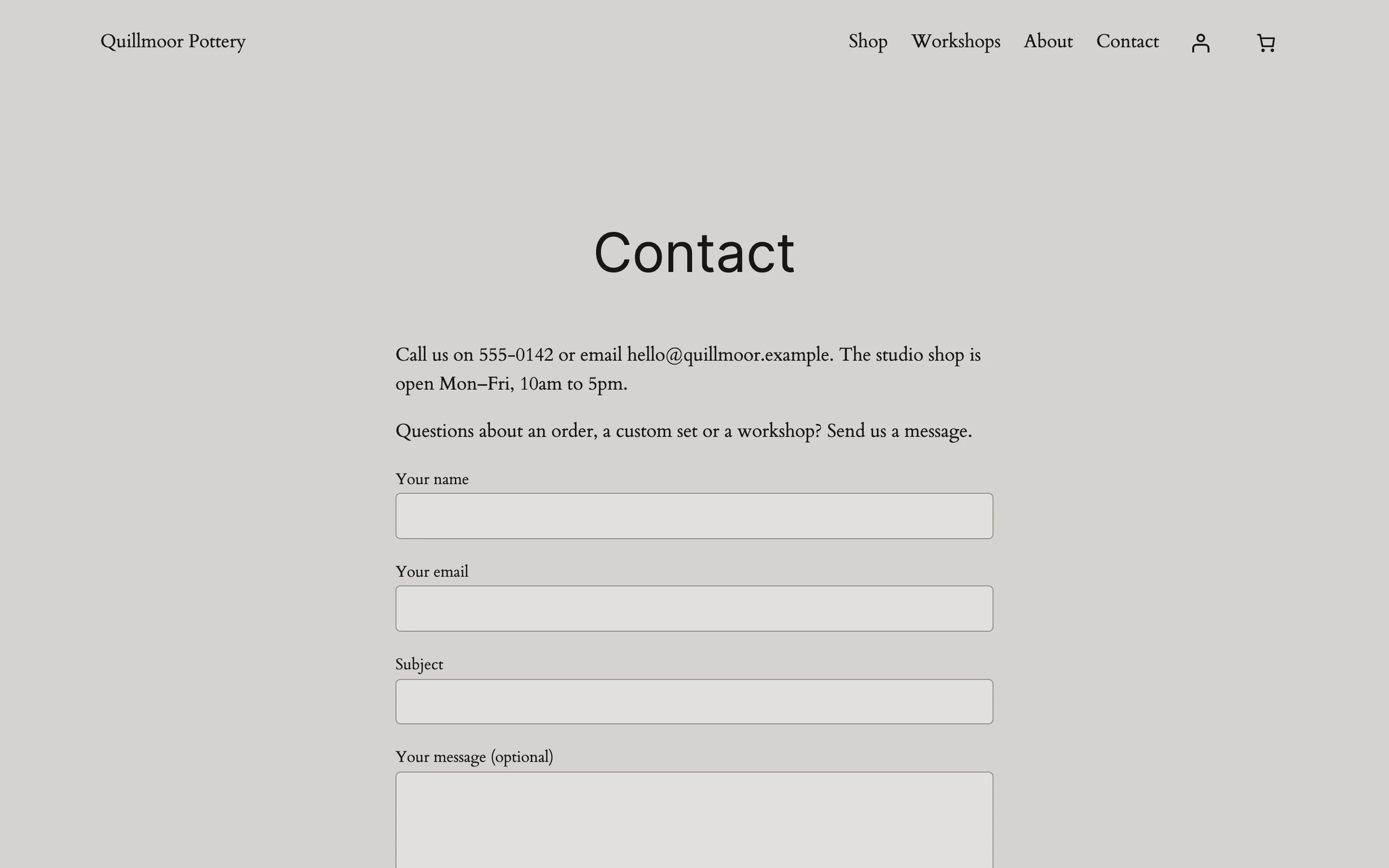
Done. I checked afterwards, and the change is in place.
- Reverting the change
- Checking the change
Undone. I checked afterwards, and it's back the way it was.
A real run on our test site, Quillmoor Pottery (WP 7.1.3, Twenty Twenty-Four), . From asking to done, it took 50 seconds.
- It adds CSS, the rules that set how your site looks, kept inside one box on the page, like the one Gravity Forms puts around each form. Block themes only.
- You see the page before and after in pictures, approve it, and one click undoes it. The run above shows that on a Contact Form 7 form.
- On an older (classic) theme it writes the CSS for you to paste.
Do this on your own site
That's the whole job. The plugin is free: 3 changes to try it, no account. Nothing changes until you press the button, and an undo within 24 hours gives the change back.
How to style Gravity Forms with CSS in WordPress yourself
In WordPress, open Appearance › Editor › Styles › Additional CSS, add rules that start with your form's ID, like #gform_wrapper_1, then save.
Updated , checked on WP 7.1,
1. Find your form's ID: go to Forms › Forms and read the ID column next to the form's name.
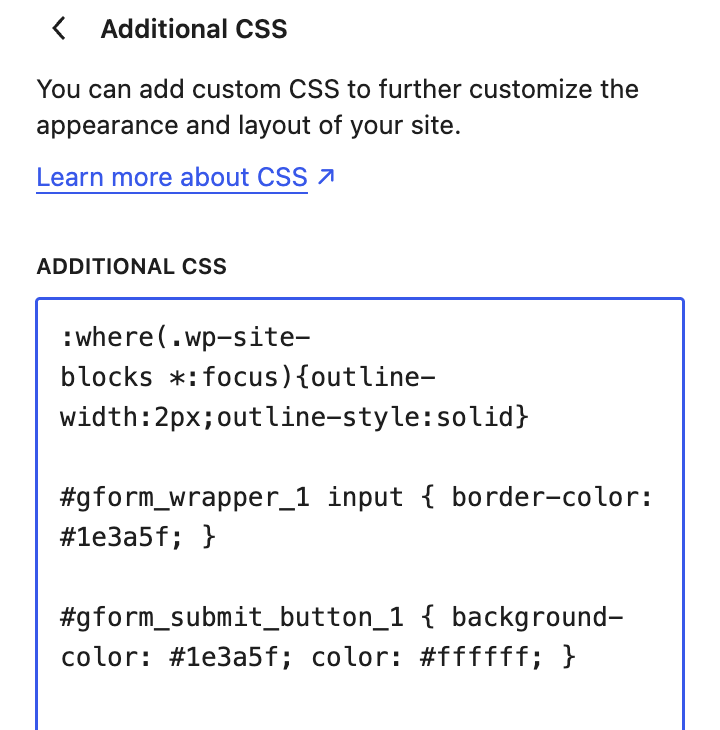
2. Write your CSS, the rules that set how your site looks. This makes form 1's field borders dark blue:
#gform_wrapper_1 input { border-color: #1e3a5f; }3. Change the 1 to your form's ID; it keeps the rule to that form. For every form at once, start with
.gform_wrapperinstead.4. The submit button has its own ID. This makes form 1's button dark blue with white text:
#gform_submit_button_1 { background-color: #1e3a5f; color: #ffffff; }5. In your dashboard, go to Appearance › Editor › Styles. Open the ⋮ (More) menu and choose Additional CSS.
Show the picture
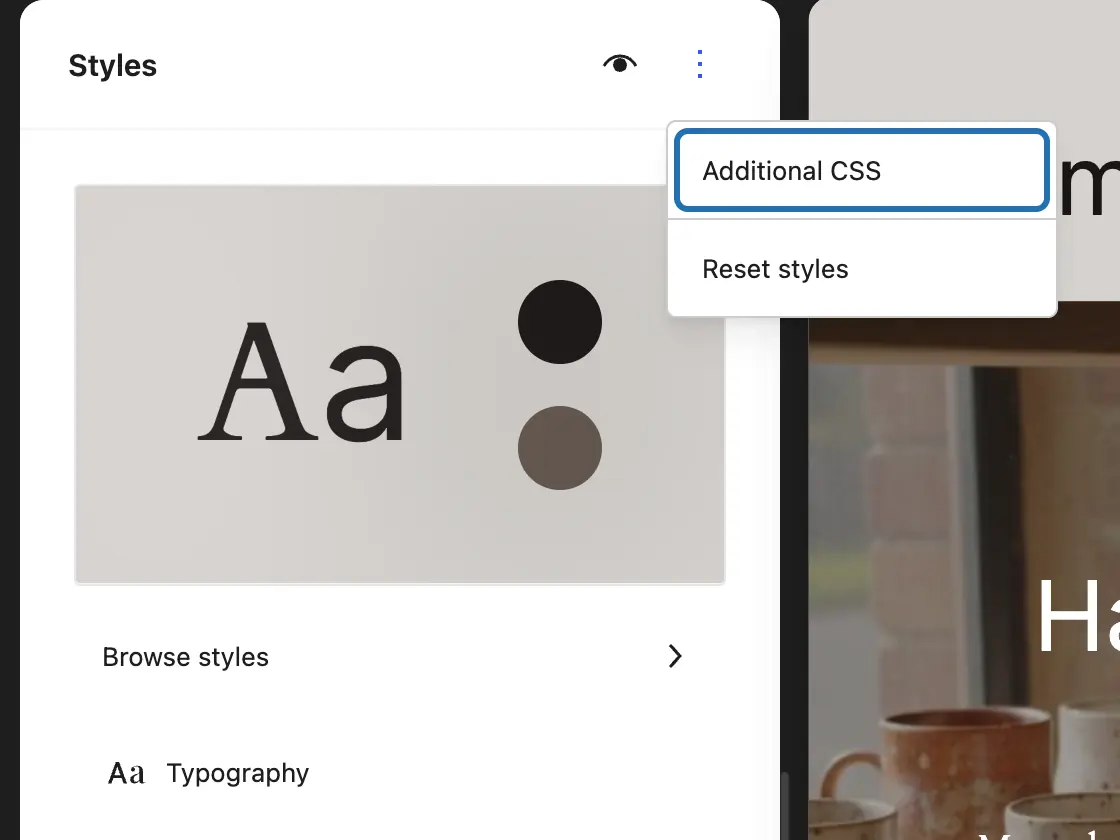
6. Paste your rules at the end of the box, under the line that was already there.
Show the picture
7. Press Review 1 change… at the bottom left (the number counts your edits), then Save.
Show the picture

8. Open the form's page in a new tab, and on your phone. Leave a required field empty and press submit to see the error style.


Got an older (classic) theme, one with Appearance › Customize and no Editor? Your rules go in Appearance › Customize › Additional CSS, and Publish keeps them. CMSHands can't reach that box. It writes the rules in the chat for you to paste there.
Gravity Forms puts each form in a box with the class gform_wrapper and an ID of its own: gform_wrapper_ plus the form's ID. Inside it, .gfield_label is a field's label, .gfield_description its help text, .gfield_validation_message an error and .gform_footer the button row. So #gform_wrapper_1 .gfield_label { font-weight: 600; } makes form 1's labels bold. Your rules live in your site's styles, so Gravity Forms updates leave them alone; a new theme starts without them. We checked the WordPress steps on our test site. The Gravity Forms names come from its own documentation, since we can't open its screens there yet.
Or ask for it in the chat
“Make my contact form match the rest of the site.”
Why it won't wreck your site
- Nothing changes until you press the button. Every change comes as a card that names it. Nothing happens until you press the button or Not now.
- You see it first. Old words in red, new words in green. For layout, before-and-after pictures on a computer and a phone.
- One click undoes it. When something can't be undone, like deleting a page or a plugin, the card says so before you press.
What it won't do here
- Older (classic) themesThat's a theme with Appearance › Customize instead of Editor. It can't add CSS there; it writes the CSS for you to paste in Appearance › Customize › Additional CSS.
- Building or changing the formIt styles how your form looks. It doesn't add fields, change what the form asks, or touch its settings, notifications or entries.
- The Gravity Forms block's own style settingsIt leaves the style settings on the Gravity Forms block alone. Its rules go in your site's Additional CSS, where you can read them and change them later.
- Fonts, pictures and scriptsOnly plain CSS rules. Nothing loaded from other sites, like a web font or a background picture, and no JavaScript, the code that makes a page react to clicks.
- Not run on Gravity Forms yetOur test site has no Gravity Forms license. The tool accepts its form box, but we haven't seen yet whether the rules it writes beat Gravity Forms' own styles.
More it can do
- Header and footer:
Keep your header on screen
“Make my header stay at the top of the screen when people scroll.”
It took 2 minutes 9 seconds on our test site. - Header and footer:
Change your footer
“Add our opening hours to the footer: Tue–Sat, 10am to 5pm.”
It took 39 seconds on our test site. - Header and footer:
Add a link to your menu
“Add a "Workshops" link to my footer menu, pointing to the Workshops page.”
It took 26 seconds on our test site.
Questions
How do I add custom CSS to Gravity Forms?
Put the rules in your site's Additional CSS. On a block theme that's Appearance › Editor › Styles, then the ⋮ menu › Additional CSS. Start each rule with #gform_wrapper_ and the form's ID, so it touches only that form. For one field, open it in the form editor and type a name like big-field under Appearance › Custom CSS Class. Then write #gform_wrapper_1 .big-field input { font-size: 20px; }
How do I change the placeholder text color in Gravity Forms?
Add a placeholder rule inside your form's box, with your form's ID in place of the 1: #gform_wrapper_1 input::placeholder { color: #6b6b6b; } For a message box, use textarea instead of input. Pick a grey dark enough to read. A very light one is hard to see, and a very dark one looks like an answer that's already filled in.
Why isn't my Gravity Forms CSS working?
Usually another rule wins. Gravity Forms and your theme both style forms, and when two rules clash, the more specific one wins. Start yours with the form's ID, like #gform_wrapper_1 input. An ID outranks the class names most of those rules use. Check that the number is your form's ID, then clear any cache plugin and reload the page.
Do I need a styling plugin for Gravity Forms?
Usually not. Gravity Forms 2.7 and newer has style settings on the form's block in the editor, for colors, sizes and corners. For the rest, a few lines of CSS do it, each starting with your form's ID. On a block theme, CMSHands can write and add them. We've run that on Contact Form 7, not on Gravity Forms yet.
Is it free?
To start, yes: 3 changes with no account, then 10 a month once you add your email. Questions are free, up to 30 a day.
Written by the CMSHands team. First published .
Try it on your own form
- 1. Download the plugin.A free zip file
- 2. Upload and activate it.Plugins › Add Plugin › Upload Plugin
- 3. Give CMSHands a task.Press Start working, then ask in your words
Works best on WP 6.3 or newer with PHP 8.0 or newer. What works on older sites