
AI Engine alternative with no API key
AI Engine is a trademark of its owner. CMSHands is not affiliated with it.
CMSHands, a free WordPress plugin, adds a chat to your dashboard, no API key needed. Ask it to write posts, style pages or install plugins. Undo puts it back.
Posts work on block and classic themes. Styling needs a block theme: your dashboard has Appearance › Editor.
Posts work on block and classic themes. Styling needs a block theme: your dashboard has Appearance › Editor.
Works on sites hosted at





AI Engine and CMSHands, compared
| CMSHands | AI Engine | |
|---|---|---|
| Built for | Doing jobs on the one site you run, from a chat in your WP dashboard, the screens you log in to at yoursite.com/wp-admin | Connecting WordPress with AI models: chatbots, content, forms and tasks1 |
| To start | Install the plugin and type. No API key and no AI account | Get an API key from OpenAI or another AI provider, and add it in its settings1 |
| Price | Free to start: 3 changes, then 10 a month with your email. Questions free, 30 a day. More changes on Pro and Max | The plugin is free. You pay your AI provider for what you use. A Pro version adds forms, knowledge bases and more1, 2 |
| Writing a post | Ask in the chat. It writes the post and asks before it goes on your site. Undo takes it down | Content Studio turns a brief into a full draft. A tool in the post editor rewrites and translates text1 |
| Plugins and styles | Finds and installs plugins from the WP plugin directory. Writes CSS, the rules that set how your site looks, on block themes | Pro's extra MCP tools add plugin and theme management, for an AI app you connect1 |
| Before a change | A card, a box in the chat that shows exactly what would change. Nothing changes until you press, and Undo puts it back | Workspace, its full-screen chat in wp-admin, asks for approval before any change1 |
| A chatbot for visitors | No. The chat is for you, in your dashboard | Yes: five themes, voice, file uploads and conversation memory1 |
| Images | No. It can't make images | Image Studio makes images from a prompt and edits them1 |
| Outside AI apps (MCP) | No. CMSHands has no MCP server | A free MCP server, a way for AI apps to use tools on your site, with more than 50 tools1 |
| Many sites | No: one site per install | Yes: connect several WP sites and manage them through conversation1 |
Built for
- CMSHands
- Doing jobs on the one site you run, from a chat in your WP dashboard, the screens you log in to at yoursite.com/wp-admin
- AI Engine
- Connecting WordPress with AI models: chatbots, content, forms and tasks1
To start
- CMSHands
- Install the plugin and type. No API key and no AI account
- AI Engine
- Get an API key from OpenAI or another AI provider, and add it in its settings1
Price
- CMSHands
- Free to start: 3 changes, then 10 a month with your email. Questions free, 30 a day. More changes on Pro and Max
Show 7 more rows
Writing a post
- CMSHands
- Ask in the chat. It writes the post and asks before it goes on your site. Undo takes it down
- AI Engine
- Content Studio turns a brief into a full draft. A tool in the post editor rewrites and translates text1
Plugins and styles
- CMSHands
- Finds and installs plugins from the WP plugin directory. Writes CSS, the rules that set how your site looks, on block themes
- AI Engine
- Pro's extra MCP tools add plugin and theme management, for an AI app you connect1
Before a change
- CMSHands
- A card, a box in the chat that shows exactly what would change. Nothing changes until you press, and Undo puts it back
- AI Engine
- Workspace, its full-screen chat in wp-admin, asks for approval before any change1
A chatbot for visitors
- CMSHands
- No. The chat is for you, in your dashboard
- AI Engine
- Yes: five themes, voice, file uploads and conversation memory1
Images
- CMSHands
- No. It can't make images
- AI Engine
- Image Studio makes images from a prompt and edits them1
Outside AI apps (MCP)
- CMSHands
- No. CMSHands has no MCP server
- AI Engine
- A free MCP server, a way for AI apps to use tools on your site, with more than 50 tools1
Many sites
- CMSHands
- No: one site per install
- AI Engine
- Yes: connect several WP sites and manage them through conversation1
CMSHands and AI Engine, side by side. AI Engine facts read Oct 14, 2026.
- 1. wordpress.org/plugins/ai-engine, Oct 14, 2026
- 2. meowapps.com/ai-engine, Oct 14, 2026
Try it free on your own site
Free to start: 3 changes with no account, then 10 a month with your email. Questions free, 30 a day. No card.
Watch it do this on a real site
You ask
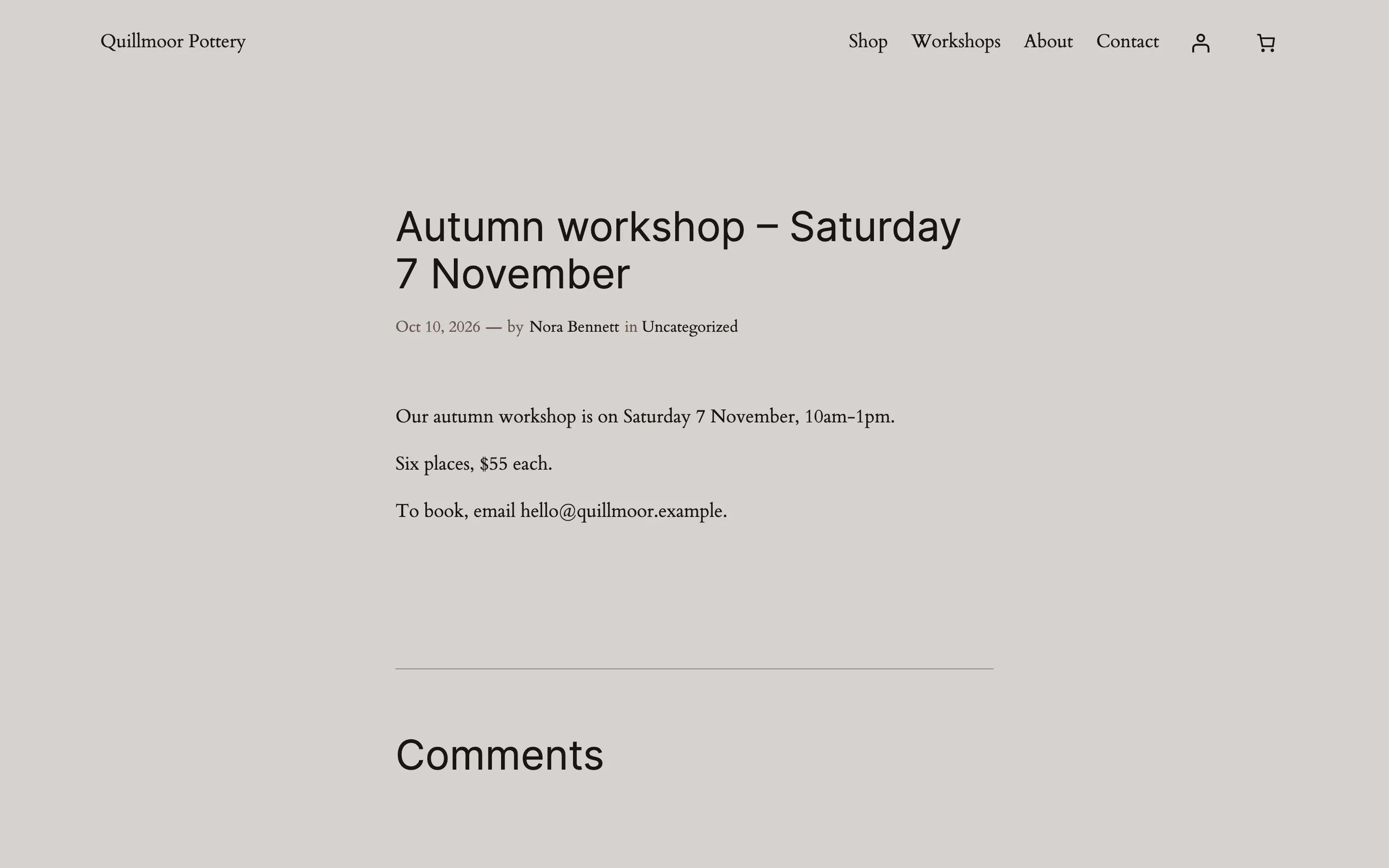
Write a short post announcing our autumn workshop from these notes, and publish it: Sat Nov 7, 10am–1pm, $55, six places, book by emailing hello@quillmoor.example.
Write a short post announcing our autumn workshop from these notes, and publish it: Sat Nov 7, 10am–1pm, $55, six places, book by emailing hello@quillmoor.example.

- Looking for what you meant
- Reading one of your posts
- Preparing the change for your OK
There was no post about this yet, and this one goes live as soon as you approve it. It isn't linked from your menu or the Workshops page — say the word if you want a link adding.
- Adding a post
- Checking the change
Done. I checked afterwards, and the change is in place.
- Reverting the change
- Checking the change
Undone. I checked afterwards, and it's back the way it was.
A real run on our test site, Quillmoor Pottery (WP 7.1.3, Twenty Twenty-Four), . From asking to done, it took 20 seconds.
- Paste your notes and it writes a post. Nothing goes on your site until you press the button on its card.
- It wrote the CSS for our Shop search box in the theme's brown and showed the page first, on desktop or phone.
- Ask for a booking calendar and it picks one from the WP plugin directory, then installs it when you say yes.
More it does here (5)
- Undo on the card takes the post down, takes the CSS out, or switches the plugin off and deletes it.
- It changes words on your pages, and the header and footer on block themes.
- On block themes it adds a button or moves a block, with before-and-after pictures for desktop and phone.
- It updates plugins from the WP plugin directory, checks your site after, and puts the old version back if it got worse.
- Ask “Give me a health report” and it answers without changing anything.
Do this on your own site
That's the whole job. The plugin is free: 3 changes to try it, no account. Nothing changes until you press the button, and an undo within 24 hours gives the change back.
Which one fits
Who should keep AI Engine
Keep AI Engine if you want a chatbot for your visitors, AI forms, or images made from a prompt. It also lets you pick your AI provider, lets outside AI apps work on your site through its free MCP server, and can manage several sites from one conversation (wordpress.org/plugins/ai-engine, read Oct 14, 2026). CMSHands does none of these. It does jobs on your one site, from its own chat, with no key to set up.
Can you use AI Engine and CMSHands together?
Yes, they're separate plugins. You could keep AI Engine's chatbot for your visitors and use the CMSHands chat for changes to your site. We haven't tested the two side by side on our test site yet, so make a change from one of them at a time, or you won't know which one changed what.
Why it won't wreck your site
- Nothing changes until you press the button. Every change comes as a card that names it. Nothing happens until you press the button or Not now.
- You see it first. Old words in red, new words in green. For layout, before-and-after pictures on a computer and a phone.
- One click undoes it. When something can't be undone, like deleting a page or a plugin, the card says so before you press.
Where CMSHands stops
- Styling needs a block themeOn an older theme, one with Appearance › Customize instead of Editor, it writes the CSS and tells you where to paste it.
- A new post goes live when you pressThe card names the post but doesn't show its words. Read it on your site after, and press Undo if it's wrong.
- Undo removes a plugin, not what it madeUndo switches the plugin off and deletes it. In our test, Events Manager's 5 pages and its settings stayed. Delete those pages yourself in Pages.
- Plugins from the WP plugin directory onlyIt finds and installs the free plugins at wordpress.org. A plugin you bought installs through its maker.
- No image makingIt can't make a picture. Send one in the chat and it goes on after your OK.
Free to start
- No account
- 3 to try it
- With your email
- 10 every month
- Pro or Max
- 100 a month on Pro ($20), 500 on Max ($100), shared by your sites
A change is one card you approve. A job that touches several pages or plugins is several changes.What's free
More it can do
- Words and pages:
Rename or add a blog category
“Rename the blog category "News" to "Studio news" and add a new category "Glazes".”
It took 15 seconds on our test site. - Header and footer:
Change your footer
“Add our opening hours to the footer: Tue–Sat, 10am to 5pm.”
It took 39 seconds on our test site. - Updates and going back:
Update plugins safely
“Update Contact Form 7 and check my site after.”
It took 17 seconds on our test site.
Questions about AI help in WordPress
Is CMSHands made by AI Engine?
No. CMSHands is a separate plugin from a separate company, and it isn't affiliated with AI Engine or Meow Apps. If you use AI Engine and want its settings, they're under Meow Apps › AI Engine in your WP dashboard. For help with it, go to meowapps.com.
Is AI Engine free?
Yes. The plugin is free on wordpress.org, and so is its MCP server. You need your own API key from an AI provider such as OpenAI, and you pay that provider for what you use. We read this on wordpress.org/plugins/ai-engine on Oct 14, 2026.
What does AI Engine Pro add?
AI forms, knowledge bases built from your content and PDFs, function calling, an editor sidebar that rewrites and moves blocks, usage limits per role, and extra MCP tools for plugins, themes and the database. That's the Pro list on wordpress.org/plugins/ai-engine, read Oct 14, 2026. For the price, see meowapps.com.
Can the AI Engine WordPress plugin make changes to my site?
Yes, through MCP, a way for AI apps to use tools on your site. An AI app you connect can write and edit posts, manage media and moderate comments. Its Workspace chat asks for approval before any change. Plugin, theme and database tools come with Pro (wordpress.org/plugins/ai-engine, read Oct 14, 2026).
Do I need an API key to use CMSHands?
No. Install the plugin, open the chat in your WP dashboard and type. There's no AI account to make and no key to paste. You get 3 changes with no account, then 10 a month once you add your email. Questions are free, up to 30 a day.
Which AI does CMSHands use?
An AI model run by an outside AI company. For each chat we send it your message and what the assistant reads on your site. More in Is CMSHands safe for your WP site?.
Written by the CMSHands team. First published .
Try it on your own site
- 1. Download the plugin.A free zip file
- 2. Upload and activate it.Plugins › Add Plugin › Upload Plugin
- 3. Give CMSHands a task.Press Start working, then ask in your words
Works best on WP 6.3 or newer with PHP 8.0 or newer. What works on older sites