
Codeable alternative for small WP changes
Codeable is a trademark of its owner. CMSHands is not affiliated with it.
CMSHands, a free WordPress plugin, adds a chat to your business site's dashboard. Ask for a small change, see what would change, then press the button. Undo puts it back.
Header and styling need a block theme: your dashboard has Appearance › Editor. Words on pages and posts: block and classic themes, and Elementor pages.
Header and styling need a block theme: your dashboard has Appearance › Editor. Words on pages and posts: block and classic themes, and Elementor pages.
Works on sites hosted at





Codeable and CMSHands, compared
| CMSHands | Codeable | |
|---|---|---|
| Built for | Small changes you can describe in one sentence, on the one site you run | Hiring vetted WordPress developers, for quick fixes, new builds and ongoing work1 |
| Who does the work | A chat in your WP dashboard, the screens you log in to at yoursite.com/wp-admin. You press the button on each change | A developer you hire, from the 1 to 5 experts it recommends for your brief3 |
| How long it takes | Our header run on Oct 10, 2026 took 54 seconds from the request to the saved change, with our press | Experts start reviewing a project in 3 to 5 hours on average. A full estimate takes about 22 to 24 hours3 |
| Price | Free to start: 3 changes, then 10 a month with your email. More changes on Pro and Max | $80 to $120 an hour, given as one estimate, plus a fixed 17.5% service fee. Paid into escrow before work starts2 |
| What it can change | Words on pages and posts. Header, footer and CSS on block themes. Elementor pages too. Not theme or plugin files, Divi or Beaver Builder | Custom plugins from $960, custom themes from $980, speed or security work from $420, its pricing guide says2 |
| If you don't like it | Undo on the card puts it back, and it checks the change after | A 28-day bug fixing warranty. A partial or full refund if the agreed work isn't delivered; its fees aren't refunded2 |
| When the site crashes | Only if CMSHands was on it before: it finds the cause and a person at CMSHands approves the fix, tried on our test sites. It can't be installed into a site that won't load | Its home page says critical issues get fixed within hours1 |
Built for
- CMSHands
- Small changes you can describe in one sentence, on the one site you run
- Codeable
- Hiring vetted WordPress developers, for quick fixes, new builds and ongoing work1
Who does the work
- CMSHands
- A chat in your WP dashboard, the screens you log in to at yoursite.com/wp-admin. You press the button on each change
- Codeable
- A developer you hire, from the 1 to 5 experts it recommends for your brief3
How long it takes
- CMSHands
- Our header run on Oct 10, 2026 took 54 seconds from the request to the saved change, with our press
- Codeable
- Experts start reviewing a project in 3 to 5 hours on average. A full estimate takes about 22 to 24 hours3
Show 4 more rows
Price
- CMSHands
- Free to start: 3 changes, then 10 a month with your email. More changes on Pro and Max
- Codeable
- $80 to $120 an hour, given as one estimate, plus a fixed 17.5% service fee. Paid into escrow before work starts2
What it can change
- CMSHands
- Words on pages and posts. Header, footer and CSS on block themes. Elementor pages too. Not theme or plugin files, Divi or Beaver Builder
- Codeable
- Custom plugins from $960, custom themes from $980, speed or security work from $420, its pricing guide says2
If you don't like it
- CMSHands
- Undo on the card puts it back, and it checks the change after
- Codeable
- A 28-day bug fixing warranty. A partial or full refund if the agreed work isn't delivered; its fees aren't refunded2
When the site crashes
- CMSHands
- Only if CMSHands was on it before: it finds the cause and a person at CMSHands approves the fix, tried on our test sites. It can't be installed into a site that won't load
- Codeable
- Its home page says critical issues get fixed within hours1
CMSHands and Codeable, for small changes on one site. Codeable facts read Oct 14, 2026.
- 1. codeable.io, Oct 14, 2026
- 2. codeable.io/pricing, Oct 14, 2026
- 3. codeable.io/how-it-works, Oct 14, 2026
Try it free on your own site
Free to start: 3 changes with no account, then 10 a month with your email. Questions free, 30 a day. No card.
Watch it do this on a real site
You ask
Add our phone number, 555-0142, to the header.
Add our phone number, 555-0142, to the header.

- Looking at your themes
- Looking at your theme’s colours and sizes
- Reading your header
- Reading your footer
- Preparing the change for your OK
- Previewing your header
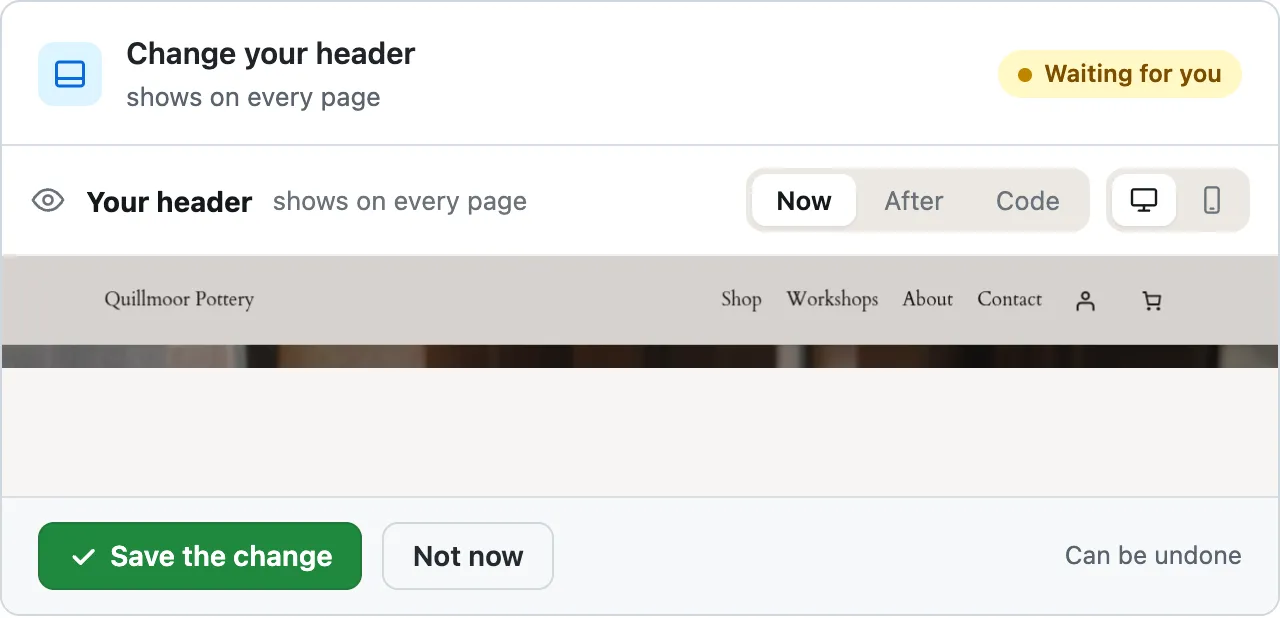
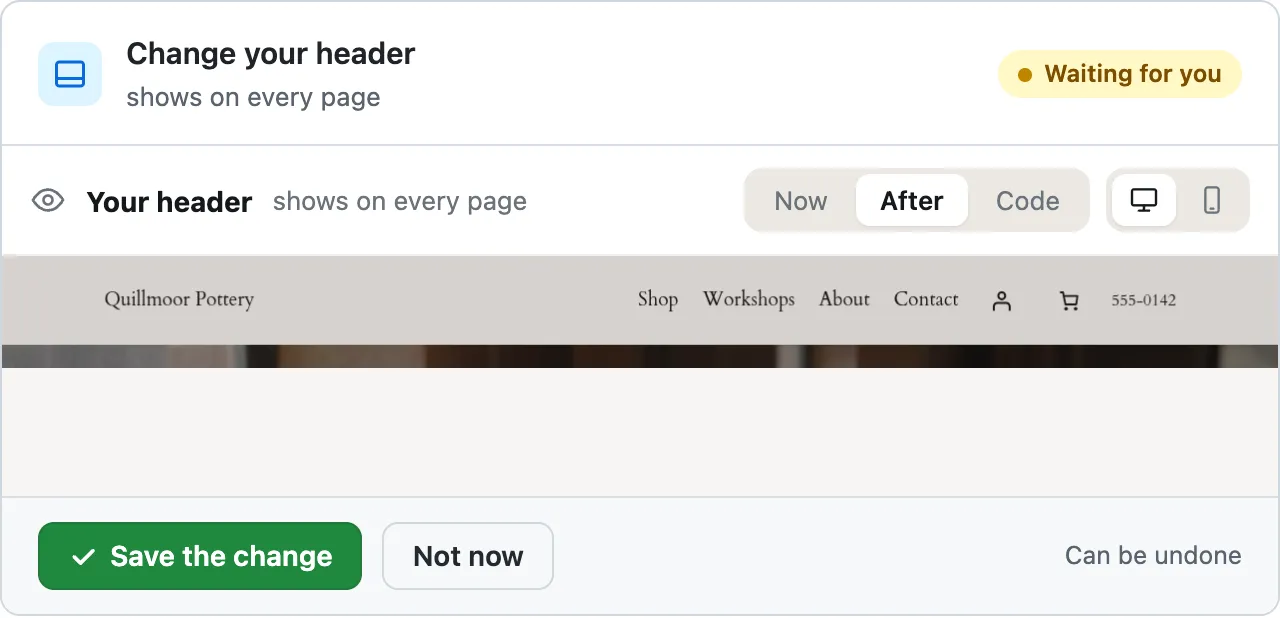
- <!-- wp:group {"layout":{"type":"flex","flexWrap":"wrap","justifyContent":"left"}} -->
- <div class="wp-block-group">
- <!-- wp:navigation {"layout":{"type":"flex","justifyContent":"right","orientation":"horizontal"},"style":{"spacing":{"margin":{"top":"0"},"blockGap":"var:preset|spacing|20"},"layout":{"selfStretch":"fit","flexSize":null}},"metadata":{"ignoredHookedBlocks":["woocommerce/customer-account"]}} /--><!-- wp:woocommerce/customer-account {"displayStyle":"icon_only","iconStyle":"line","iconClass":"wc-block-customer-account__account-icon"} /--><!-- wp:woocommerce/mini-cart /-->
- <!-- wp:navigation {"layout":{"type":"flex","justifyContent":"right","orientation":"horizontal"},"style":{"spacing":{"margin":{"top":"0"},"blockGap":"var:preset|spacing|20"},"layout":{"selfStretch":"fit","flexSize":null}},"metadata":{"ignoredHookedBlocks":["woocommerce/customer-account"]}} /--><!-- wp:woocommerce/customer-account {"displayStyle":"icon_only","iconStyle":"line","iconClass":"wc-block-customer-account__account-icon"} /--><!-- wp:woocommerce/mini-cart /--><!-- wp:paragraph {"fontSize":"small"} -->
- <p class="has-small-font-size">555-0142</p>
- <!-- /wp:paragraph -->
- </div>
- <!-- /wp:group -->
- </div>
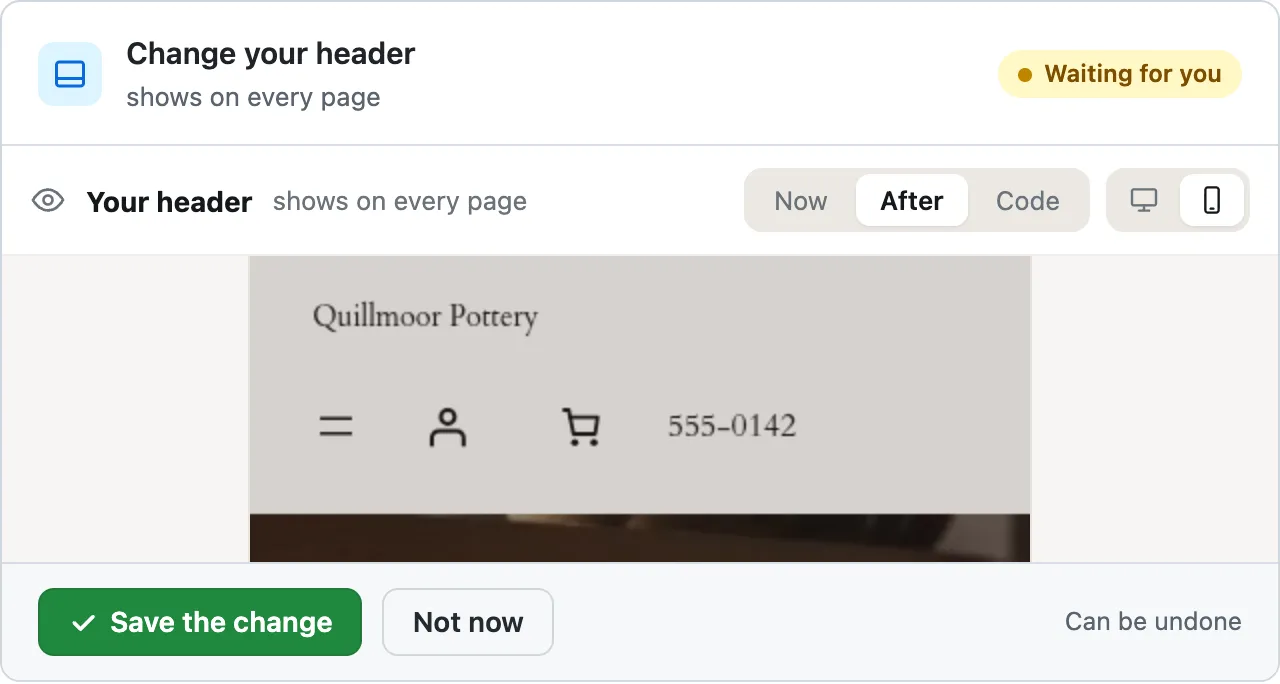
I'll look at your header first.
It's ready for you to review — on a narrow screen the header now wraps onto two rows, with the number after the cart icon.
Add our phone number, 555-0142, to the header.
- <!-- wp:group {"layout":{"type":"flex","flexWrap":"wrap","justifyContent":"left"}} -->
- <div class="wp-block-group">
- <!-- wp:navigation {"layout":{"type":"flex","justifyContent":"right","orientation":"horizontal"},"style":{"spacing":{"margin":{"top":"0"},"blockGap":"var:preset|spacing|20"},"layout":{"selfStretch":"fit","flexSize":null}},"metadata":{"ignoredHookedBlocks":["woocommerce/customer-account"]}} /--><!-- wp:woocommerce/customer-account {"displayStyle":"icon_only","iconStyle":"line","iconClass":"wc-block-customer-account__account-icon"} /--><!-- wp:woocommerce/mini-cart /-->
- <!-- wp:navigation {"layout":{"type":"flex","justifyContent":"right","orientation":"horizontal"},"style":{"spacing":{"margin":{"top":"0"},"blockGap":"var:preset|spacing|20"},"layout":{"selfStretch":"fit","flexSize":null}},"metadata":{"ignoredHookedBlocks":["woocommerce/customer-account"]}} /--><!-- wp:woocommerce/customer-account {"displayStyle":"icon_only","iconStyle":"line","iconClass":"wc-block-customer-account__account-icon"} /--><!-- wp:woocommerce/mini-cart /--><!-- wp:paragraph {"fontSize":"small"} -->
- <p class="has-small-font-size">555-0142</p>
- <!-- /wp:paragraph -->
- </div>
- <!-- /wp:group -->
- </div>
- Changing your header
- Checking the change
Done. I checked afterwards, and it now says "555-0142".

- Reverting the change
- Checking the change
Undone. I checked afterwards, and it's back the way it was.
A real run on our test site, Quillmoor Pottery (WP 7.1.3, Twenty Twenty-Four), . From asking to done, it took 54 seconds.
- Type a small job in plain words, like a phone number for the header. It finds the right place on its own. Header changes need a block theme.
- Nothing changes until you press the button on the card, a box in the chat that shows exactly what would change.
- Undo on the card puts it back. In our header run on Oct 10, 2026, Undo took the number out again and checked the header.
More it does here (4)
- It writes CSS, the rules that set how your site looks, and shows the result on a phone before you press. Needs a block theme.
- Ask to change a sentence on a page or post, and the card shows the old words and the new ones.
- If a plugin crashes a site that had CMSHands first, it prepares the fix and a person at CMSHands approves it. Tried on our test sites; hosts differ.
- It updates a plugin from the WP plugin directory, checks the site, and puts the old version back if it got worse.
Do this on your own site
That's the whole job. The plugin is free: 3 changes to try it, no account. Nothing changes until you press the button, and an undo within 24 hours gives the change back.
Which one fits
Who should keep Codeable
Keep Codeable for work a developer has to do: a custom plugin, a new theme, a store build, or a site that's already down. Its pricing guide lists custom plugins from $960 and custom themes from $980, at $80 to $120 an hour plus a 17.5% fee (codeable.io/pricing, read Oct 14, 2026). CMSHands doesn't edit theme or plugin files, and it can't be installed into a site that won't load.
Can you use Codeable and CMSHands together?
Yes. Ask the chat for small changes you can describe in one sentence, like a phone number in the header. Hire a developer for custom code, a new theme or a store build. CMSHands changes nothing until you press the button on its card.
Why it won't wreck your site
- You see it first. Old words in red, new words in green. For layout, before-and-after pictures on a computer and a phone.
- Nothing changes until you press the button. Every change comes as a card that names it. Nothing happens until you press the button or Not now.
- One click undoes it. When something can't be undone, like deleting a page or a plugin, the card says so before you press.
Where CMSHands stops
- Custom code, theme files or plugin filesIt doesn't edit your theme's or plugins' files, add code snippets or write a new plugin. That's still a developer's job.
- A site that's already downIt can't be installed into a site that is already down. Install it while the site works, so a crash later can be caught.
- Older (classic) themesHeader, footer and CSS changes need a block theme. On a theme with Appearance › Customize instead of Editor, it writes the CSS for you to paste.
- Widgets, theme settings and other page buildersIt changes pages, posts, and the header, footer and menus of block themes. Not widgets, theme settings, or Divi and Beaver Builder pages.
- Repairs wait for a personA person at CMSHands approves every repair before it runs, and only on sites that had CMSHands before they broke. Tried on our test sites; hosts differ.
Free to start
- No account
- 3 to try it
- With your email
- 10 every month
- Pro or Max
- 100 a month on Pro ($20), 500 on Max ($100), shared by your sites
A change is one card you approve. A job that touches several pages or plugins is several changes.What's free
More it can do
- Header and footer:
Change your footer
“Add our opening hours to the footer: Tue–Sat, 10am to 5pm.”
It took 39 seconds on our test site. - Words and pages:
Copy a page
“Make a copy of the About page as a draft called "About (new)".”
It took 16 seconds on our test site. - Health and checkups:
A security check of your site
“Check my site for security problems and tell me what to fix first.”
It took 39 seconds on our test site.
Questions about small WordPress jobs
Is CMSHands part of Codeable?
No. CMSHands is a separate product from a separate company, and it isn't affiliated with Codeable. If you're looking for your Codeable account or a project you posted, go to codeable.io.
What does Codeable cost?
Its pricing page lists $80 to $120 an hour, given as one estimate for the whole job, plus a fixed 17.5% service fee. You pay into escrow before work starts. We read this on codeable.io/pricing on Oct 14, 2026, so check there for today's prices.
How long does Codeable take to reply?
On average, experts start reviewing a project in 3 to 5 hours, and a full estimate takes about 22 to 24 hours. That's from codeable.io/how-it-works, read Oct 14, 2026. Its home page says critical issues get fixed within hours.
Is there a free alternative to Codeable for small changes?
For some changes, yes. CMSHands is a free plugin: 3 changes with no account, then 10 a month once you add your email. It changes words on pages and posts, and the header, footer and CSS on block themes. Anything that needs custom code still needs a developer.
My site is down right now. What should I do?
Start with your host's support, or hire a developer if you need it back fast. CMSHands can't be installed into a site that won't load. If the screen says “There has been a critical error on this website.”, check the site's admin email: WP often sends a link there to log in and switch off the plugin that broke it.
Written by the CMSHands team. First published .
Try it on your own site
- 1. Download the plugin.A free zip file
- 2. Upload and activate it.Plugins › Add Plugin › Upload Plugin
- 3. Give CMSHands a task.Press Start working, then ask in your words
Works best on WP 6.3 or newer with PHP 8.0 or newer. What works on older sites