
GoWP alternative inside your WP dashboard
GoWP is a trademark of its owner. CMSHands is not affiliated with it.
CMSHands, a free WordPress plugin, adds a chat to your business site's dashboard. It changes words, updates plugins, and prepares a fix if the site crashes. Undo puts it back.
A person at CMSHands approves every repair. Install it before anything breaks.
A person at CMSHands approves every repair. Install it before anything breaks.
Works on sites hosted at





GoWP and CMSHands, compared
| CMSHands | GoWP | |
|---|---|---|
| Built for | The one site you run yourself | Site owners and agencies. Agencies can manage client sites “under your own brand”1 |
| Where you work | A chat in your WP dashboard, the screens you log in to at yoursite.com/wp-admin | GoWP's dashboard, linked to your site by the GoWP connector plugin1 |
| Changes by asking | Words on pages and posts, and the header and footer on block themes. Each waits for your press, and Undo puts it back | AI edits, built in a private preview until you approve, and a published change can be undone. 5 a month on Free, 15 on Pro, 50 on Business1, 2 |
| Help from a person | A person at CMSHands approves every repair, on sites that had CMSHands before they broke | Helpdesk support from a person on Pro and Business. Business adds 5 edits a month done by a person2 |
| When the site goes down | It reads the error log and prepares a fix; a person at CMSHands approves it. Needs CMSHands on the site before it broke | It confirms the failed check, records the response, and creates an alert with what's needed to look into it4 |
| Uptime checks | Once a day on the free plan, and at once if the site crashes. Email alerts need your email | Uptime checked 12 times an hour and SSL daily, on every plan. Automatic alerts on Pro and Business4 |
| Plugin updates | One at a time, when you ask. It checks the site after and puts the old version back on its own if the site got worse. Plugins from the WP plugin directory only | Automatic updates with visual checks on Pro and Business, and an update that changed a page is rolled back. Free: 1 update a month you start yourself2, 3 |
| Themes and WP itself | No. It can tell you if a WP update looks safe. You run it yourself | Yes: WP, plugins and themes3 |
| Copies of the whole site | None. It keeps a plugin's old files during an update. That isn't a copy of your site | A copy of the whole site every day, kept 90 days, on Pro and Business2 |
| Price | Free to start: 3 changes, then 10 a month with your email. More changes on Pro and Max | Free: $0, 5 AI edits a month, no card. Pro $39 and Business $99, a site a month. Extra AI edits $30 per 102 |
Built for
- CMSHands
- The one site you run yourself
- GoWP
- Site owners and agencies. Agencies can manage client sites “under your own brand”1
Where you work
- CMSHands
- A chat in your WP dashboard, the screens you log in to at yoursite.com/wp-admin
- GoWP
- GoWP's dashboard, linked to your site by the GoWP connector plugin1
Changes by asking
- CMSHands
- Words on pages and posts, and the header and footer on block themes. Each waits for your press, and Undo puts it back
Show 7 more rows
Help from a person
- CMSHands
- A person at CMSHands approves every repair, on sites that had CMSHands before they broke
- GoWP
- Helpdesk support from a person on Pro and Business. Business adds 5 edits a month done by a person2
When the site goes down
- CMSHands
- It reads the error log and prepares a fix; a person at CMSHands approves it. Needs CMSHands on the site before it broke
- GoWP
- It confirms the failed check, records the response, and creates an alert with what's needed to look into it4
Uptime checks
- CMSHands
- Once a day on the free plan, and at once if the site crashes. Email alerts need your email
- GoWP
- Uptime checked 12 times an hour and SSL daily, on every plan. Automatic alerts on Pro and Business4
Plugin updates
- CMSHands
- One at a time, when you ask. It checks the site after and puts the old version back on its own if the site got worse. Plugins from the WP plugin directory only
Themes and WP itself
- CMSHands
- No. It can tell you if a WP update looks safe. You run it yourself
- GoWP
- Yes: WP, plugins and themes3
Copies of the whole site
- CMSHands
- None. It keeps a plugin's old files during an update. That isn't a copy of your site
- GoWP
- A copy of the whole site every day, kept 90 days, on Pro and Business2
Price
- CMSHands
- Free to start: 3 changes, then 10 a month with your email. More changes on Pro and Max
- GoWP
- Free: $0, 5 AI edits a month, no card. Pro $39 and Business $99, a site a month. Extra AI edits $30 per 102
CMSHands and GoWP, for one site. GoWP facts read Oct 14, 2026.
- 1. gowp.com, Oct 14, 2026
- 2. gowp.com/pricing, Oct 14, 2026
- 3. gowp.com/features/updates, Oct 14, 2026
- 4. gowp.com/features/monitoring, Oct 14, 2026
Try it free on your own site
Free to start: 3 changes with no account, then 10 a month with your email. Questions free, 30 a day. No card.
Watch it do this on a real site
When it works
You ask
Update Redirection and check my site after.
Update Redirection and check my site after.

- Listing your plugins and themes
- Loading a page the way a visitor would
- Preparing the change for your OK
- Redirection 5.10.0
- Redirection 5.10.1
Ready for you to review — 5.10.1 is newer but hasn't been tried on your site yet; if anything breaks after the change, 5.10.0 goes back on its own, and the check afterwards is part of the card.
Your site is up right now — the home page loads normally.
- Checking your site before the change
- Updating Redirection to 5.10.1
- Checking your site
Redirection is now on 5.10.1. I checked your homepage, login page and admin afterwards, and they load as they did before.
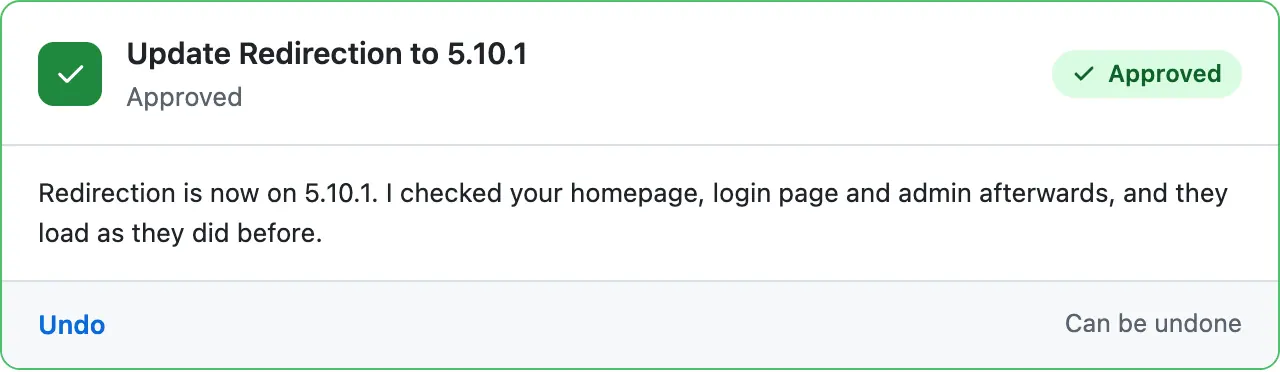
A real run on our test site, Quillmoor Pottery (WP 7.1.3, Twenty Twenty-Four), . From asking to done, it took 19 seconds.
When an update breaks the siteWe broke the update on purpose.
You press the button
- Checking your site before the change
- Updating Redirection to 5.10.1
- Checking your site
Redirection 5.10.1 broke your site when I checked it, so I put 5.10.0 back straight away. It is running 5.10.0 again.
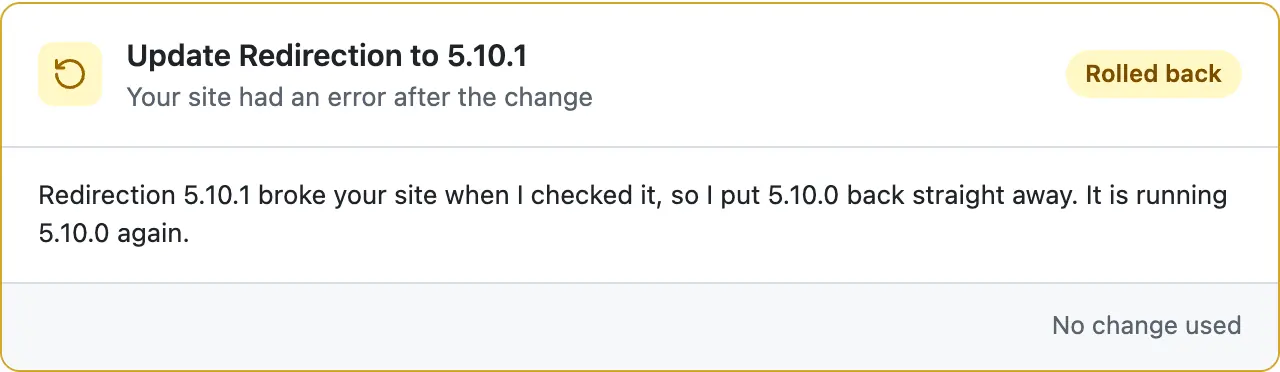
A real run on our test site, Quillmoor Pottery (WP 7.1.3, Twenty Twenty-Four), . From asking to done, it took 48 seconds. Shortened: 6 steps left out.
- It updates a plugin from the WP plugin directory, checks the site, and puts the old version back if it got worse.
- It changes words on your pages and posts. You see the change first, and Undo puts it back.
- If your site crashes, it reads the error log to find the cause. Only on sites that had CMSHands first.
More it does here (4)
- It prepares the repair, and a person at CMSHands approves it before it runs. Tried on WP sites we run for tests.
- On block themes (your dashboard has Appearance › Editor) it changes the header and footer too.
- On the free plan it checks your site once a day, and at once if it crashes. Email alerts need your email.
- Ask “Give me a health report” and it answers in one go, without changing anything.
Do this on your own site
That's the whole job. The plugin is free: 3 changes to try it, no account. Nothing changes until you press the button, and an undo within 24 hours gives the change back.
Which one fits
Who should keep GoWP
Keep GoWP if you want a service to do the upkeep for you. Its Pro plan, $39 a site a month, updates WP itself, themes and plugins automatically, with a daily copy of the whole site and daily security scans. Business adds 5 edits a month done by a person, and agencies can put their own brand on it (gowp.com/pricing, read Oct 14, 2026). CMSHands doesn't copy your whole site or update themes or WP itself.
Can you use GoWP and CMSHands together?
Yes. You can keep GoWP for its daily copies, scans and helpdesk, and ask the chat for small changes. We haven't tested the two side by side on our test site yet, so let one of them update your plugins, not both, or you won't know which one changed what.
Why it won't wreck your site
- A person checks every repair. When your site is down you can't reach the chat, so a person at CMSHands approves the fix before it runs.
- It checks your pages after the fix. It loads your home page, login, dashboard and a post again before it calls the repair done.
Where CMSHands stops
- Sites that are already downIt can't be installed into a site that won't load. Install it while the site works, so it's there when something breaks.
- Copies of your whole siteIt doesn't keep copies of your whole site. Keep GoWP's daily copies, your host's, or a plugin that makes them.
- WP itself and themesIt can tell you if a WP update looks safe, but you run that update yourself. It doesn't update themes.
- Premium plugins, Divi and Beaver BuilderUpdates cover plugins from the WP plugin directory, the free plugins at wordpress.org. It doesn't change widgets, or pages made with Divi or Beaver Builder.
- A daily check, not a constant watchOn the free plan it checks your site once a day. If the site crashes, we check at once. Email alerts need your email address.
Free to start
- No account
- 3 to try it
- With your email
- 10 every month
- Pro or Max
- 100 a month on Pro ($20), 500 on Max ($100), shared by your sites
A change is one card you approve. A job that touches several pages or plugins is several changes.What's free
More it can do
- Styling and forms:
Make a form match your site
“Make my contact form match the rest of the site.”
It took 50 seconds on our test site. - Plugins:
Find the right plugin
“Which popup plugin should I use for a newsletter sign-up?”
It took 4 seconds on our test site. - Updates and going back:
Go back to a plugin that worked
“Duplicate Page stopped working after the update. Go back to the version that worked.”
It took 1 minute 28 seconds on our test site.
Questions about WordPress upkeep
Is CMSHands made by GoWP?
No. CMSHands is a separate product from a separate company, and it isn't affiliated with GoWP. If you're a GoWP customer looking for your dashboard or your account, go to gowp.com.
What does GoWP cost?
GoWP has a free plan with 5 AI edits a month and no credit card. Pro is $39 a site a month and Business is $99 a site a month. Extra AI edits are $30 per 10, and an agency can put its own brand on it for $49 a month. We read these prices on gowp.com/pricing on Oct 14, 2026, so check there for today's.
Is there a free GoWP alternative for one site?
For small changes and plugin updates on one site, yes. CMSHands is a free plugin: 3 changes with no account, then 10 a month once you add your email. Questions are free, up to 30 a day. It doesn't keep copies of your whole site or run security scans, so keep your host's copies or a plugin that makes them.
What happens when my site goes down?
If CMSHands was on your site before it broke, it reads the error log and prepares a fix. A person at CMSHands approves it before it runs. On our test site, a WP site we run to try every task before we write about it, it switched off a plugin we broke on purpose. If your site is down now without CMSHands, start with your host's support.
Does it put the old version back if an update breaks the site?
Yes, for plugins from the WP plugin directory. After the update it checks your site. On our test site we broke Redirection 5.10.1 on purpose, and it said: “Redirection 5.10.1 broke your site when I checked it, so I put 5.10.0 back straight away.” That happened about 20 seconds after the update, with no press from us.
Written by the CMSHands team. First published .
Try it on your own site
- 1. Download the plugin.A free zip file
- 2. Upload and activate it.Plugins › Add Plugin › Upload Plugin
- 3. Give CMSHands a task.Press Start working, then ask in your words
Works best on WP 6.3 or newer with PHP 8.0 or newer. What works on older sites